


Below are some of the current systems / hardware / plans I recommend. These are constantly changing, so check back often.
Cellular Plans
T-Mobile
T-Mobile has a $55/month plan that provides 100GB of data. This plan has come and gone over the last 7 months or so, and the price has gone from $50 to $55. It has a lot of great features which you can read about in the article below, although some may have changed since the plan was retired and then brought back again at least once.
Recent reports indicate you have to call or go into a T-Mobile store to get this plan – it does not appear to be available online. It also appears to be available primarily via pre-paid plan, not as an additional line on an existing account.
I've used multiple versions of this plan / SIM in Peplink, Teltonika, CradlePoint, and Verizon branded hotspots without any issues.
 Steve Mitchell
Verizon
Verizon has a range of data-only pre-paid AND post-paid plans.
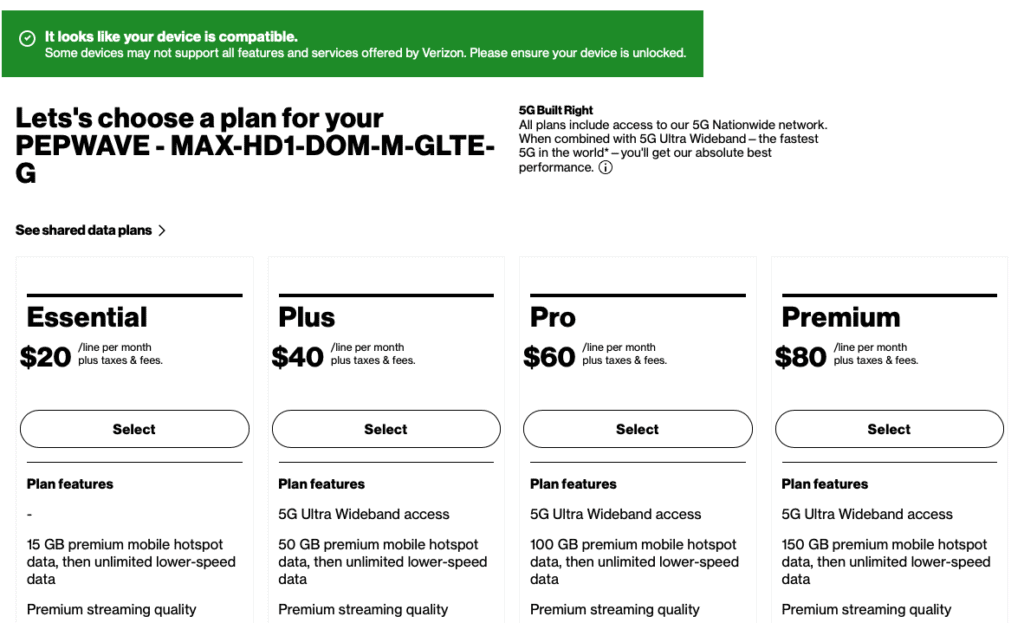
The plans include a range of data from 5GB to 150GB of monthly data. These plans are specifically for routers and hotspots, and give you options if you are an existing Verizon customer (post-paid) or if you just need a Verizon SIM and are not a customer yet (pre-paid).
The plans are capped at the monthly data allowance, similar to the T-Mobile plan above. This means once you pass your data allowance amount, speeds are throttled down quite a bit. On 5G Ultra Wideband (hard to get with current mobile routers) things will slow to around 3Mbps, and any LTE will slow down to about 600Kbps, which is pretty slow.
So far I have tested this in a handful of Peplink and CradlePoint products without any issues. I have not tested it with the newer 5G versions, nor have I tested it with other hardware from MikroTik, Amarok, Teltonika, etc. Please post your test notes in the comments below.
Post-paid will always have an advantage over pre-paid in terms of network management - Verizon tends to slow down pre-paid first, and leave post-paid alone unless something really bad is happening.
AT&T
AT&T has a pre-paid 50GB a month plan for $55 which is a great value. There are some caveats – you have to pre-pay for it monthly, versus having it on an existing AT&T account (post paid), you have to sign up in store, and there are some known issues with drop outs or data problems that are still being resolved.
If you need a good plan from AT&T, check it out at https://www.att.com/prepaid/mobile-hotspot-tablet/
Finding a Plan
Make sure to check out my article on Finding a cellular data plan for the boat for recommendations on the types of plans, how to set up the plan, and details behind 3rd party vendors, among other things.
Steve Mitchell
Satellite Systems - Starlink
Starlink has changed connectivity on boats forever, but there are a decent amount of limitations and challenges that you should be aware of. I have a dedicated page for Starlink related information and articles:
 Steve Mitchell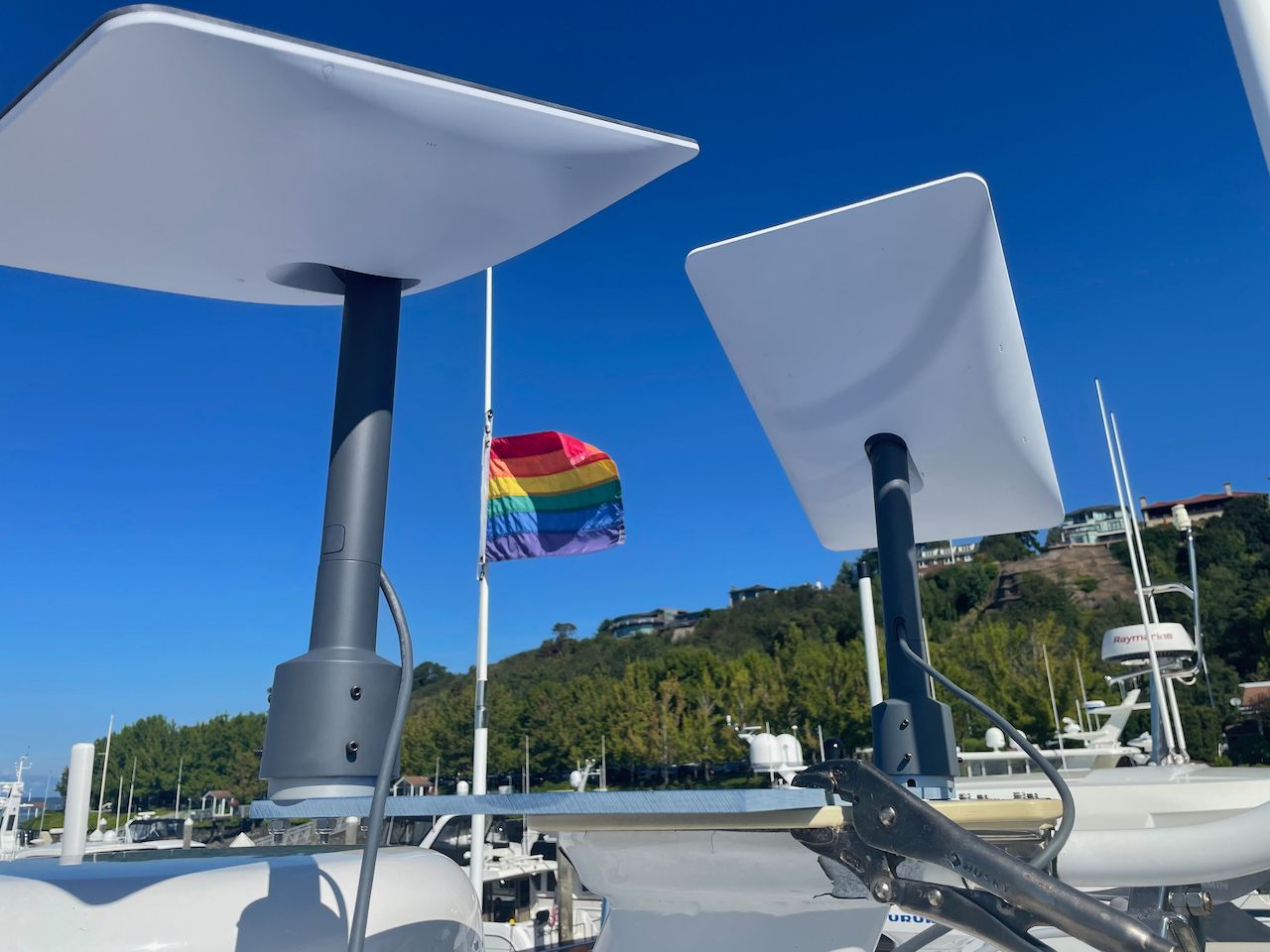
I also highly recommend using Starlink with cellular to get the best system:
Steve Mitchell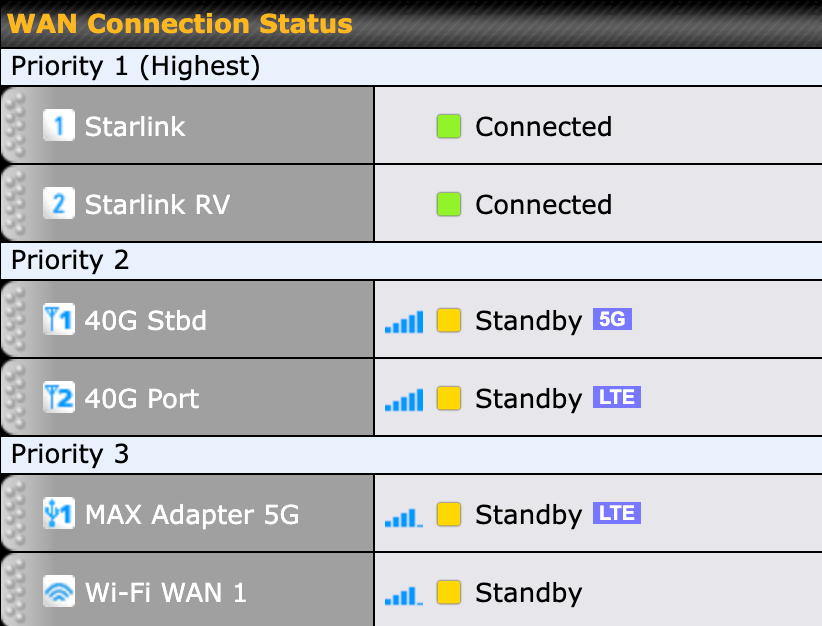
Cellular Systems
There are a lot of choices for systems, so many that this could be a very exhaustive list. I've only listed the most popular ones I've recommended or installed in three tiers – good, better, and best.
Good
Netgear Hotspot
My favorite hotspot right now is the Netgear Nighthawk 5G which is a very powerful hotspot that also includes an ethernet port. It has great battery life and is very easy to use. It has phenomenal performance on 5G, when you can get it, and is a great way to have internet aboard without investing in a full fledged router and antennas.
 Steve Mitchell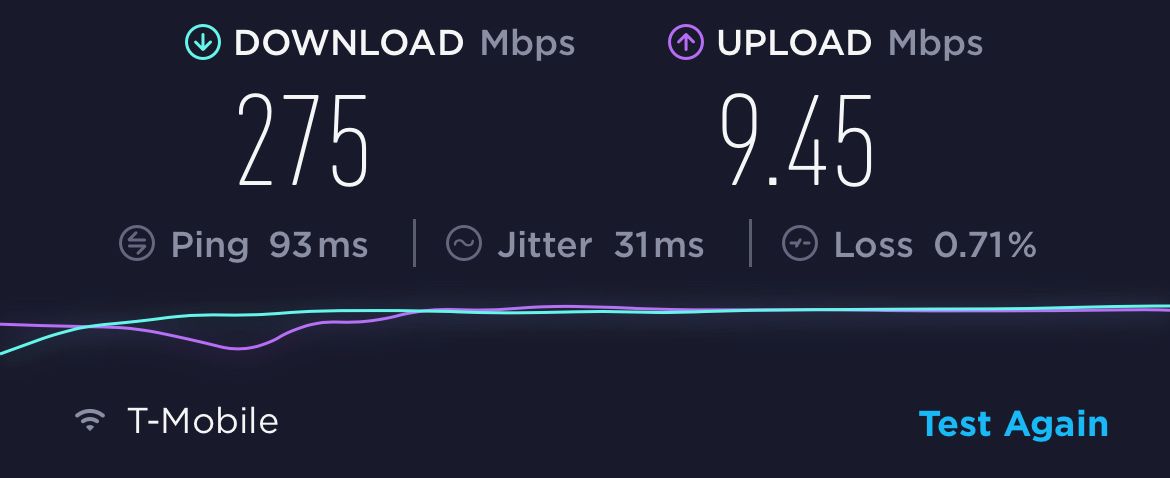
Teltonika RUTX11
The Teltonika RUTX11 is a single cellular radio router with 2.4/5Ghz local WiFi, multiple LAN and WAN ports, and other great features. You can read my review on it below.
Steve Mitchell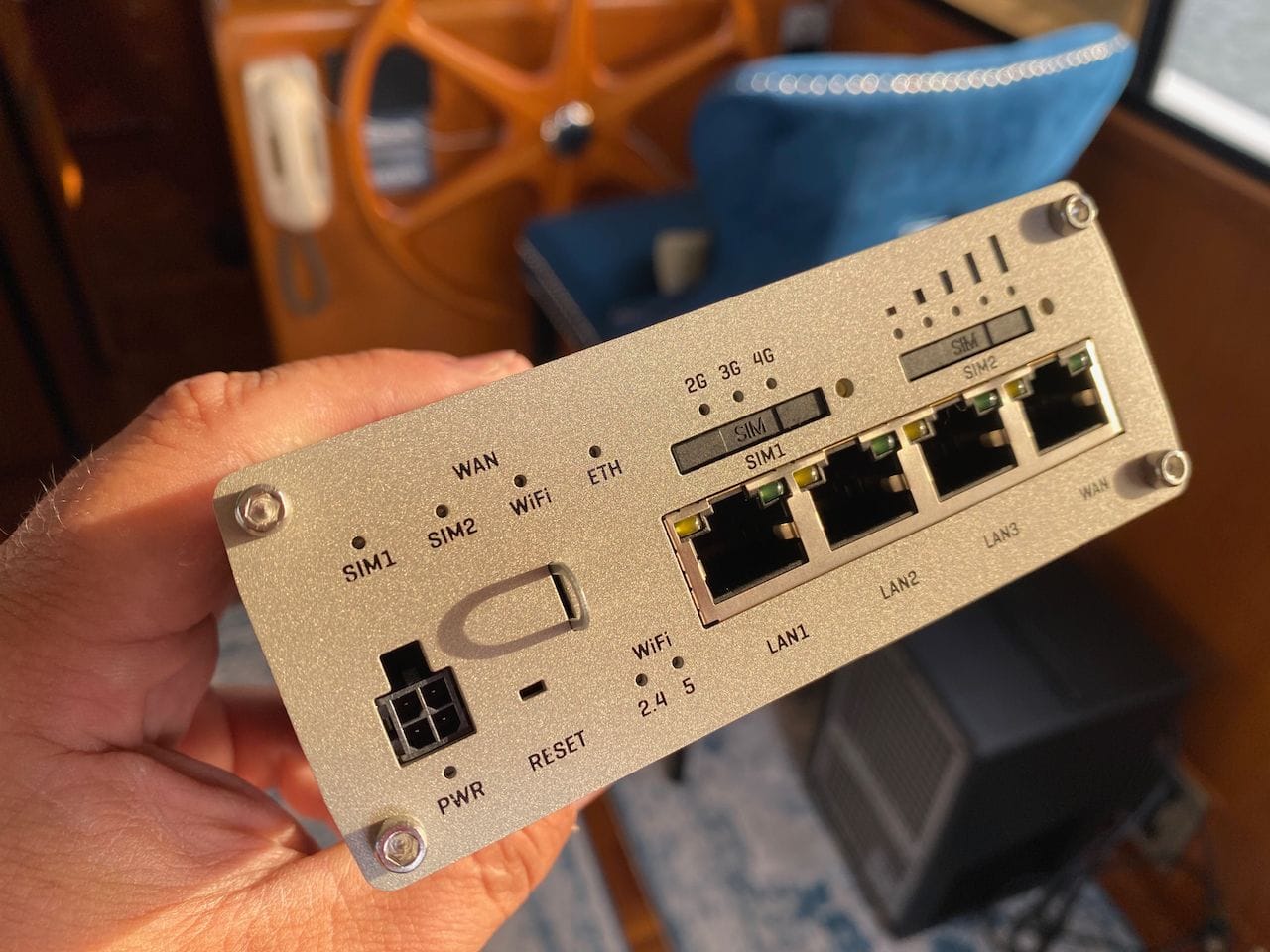
Why this is in the “Good” category and not the “Better” category is that it does not have as many easy-to-use features as the Pepwave MAX BR1 MK2 below. It's a very powerful router, and has a similar CAT6 modem, and for those looking for a good option, this is a great choice.
Better
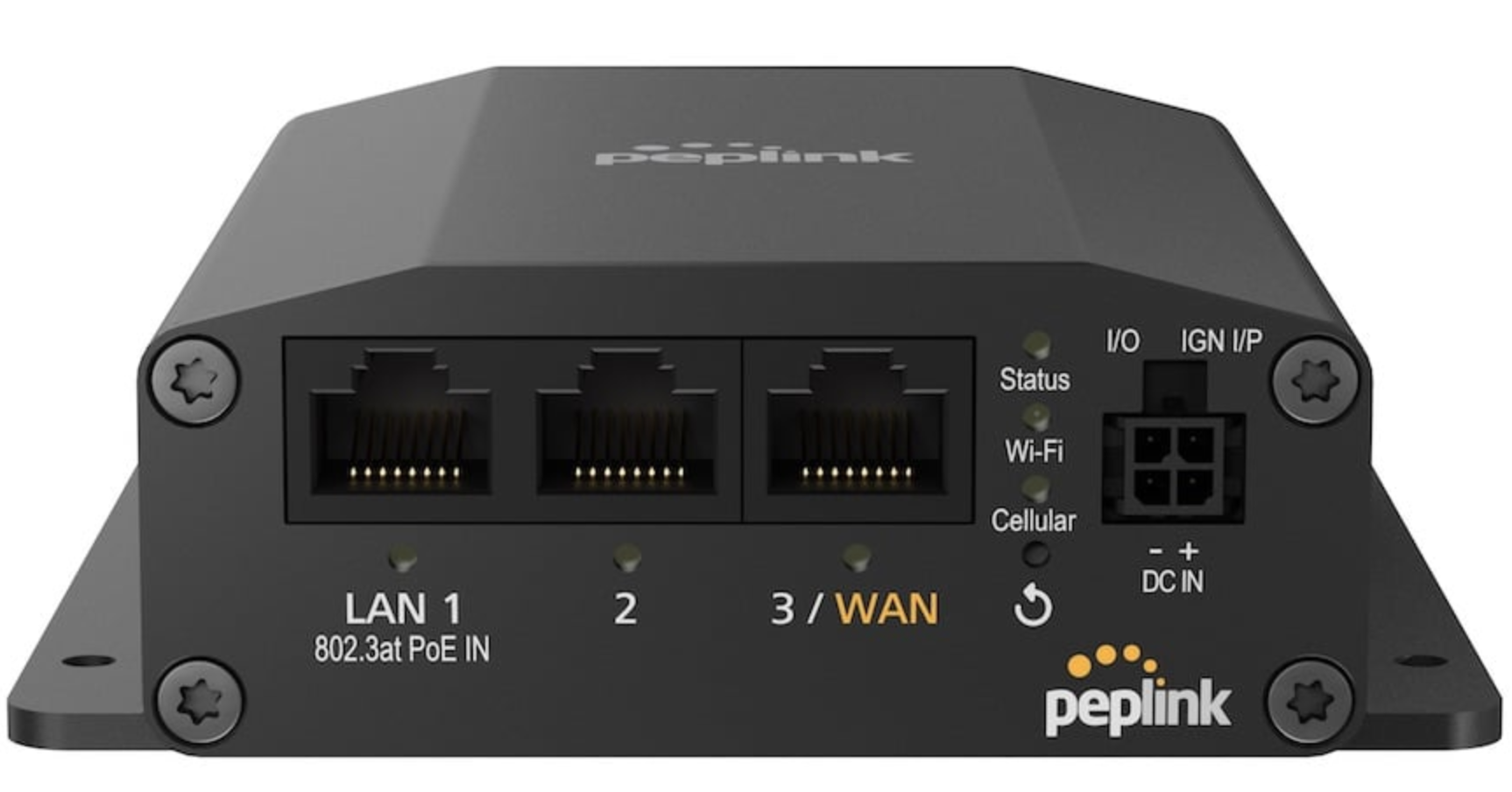
Pepwave MAX BR1 Mini LTE Router (HW3)
Peplink's Pepwave MAX BR1 Mini LTE Router (HW3) family are cost-effective, entry level complete Internet connectivity solutions in a single ruggedized metal case for your boat or vehicle. This router is available with your choice of a Category 4 or 7 LTE modem.
The BR1 series was what launched Pepwave into the market and has been popular with boaters for years, and the MAX BR1 Mini is the cheapest version of that line. It has a single category 4 or 7 cellular radio, runs off of DC power, has 2x LAN and 1x WAN ethernet port, and creates a local 2.4/5Ghz WiFi network.
I don't recommend it as much as some of the other Peplink products because of two main reasons. First, it is a category 4 or 7 modem which is quite old and does not support the newer bands that many providers are using in longer reach situations, which is where you'll be with a boat. Second, it is a single radio system which means that you have no redundancy and cannot use features like SpeedFusion to provide better performance and redundancy when working remote.
However, it is still a major upgrade from a hotspot or other system, and especially on power limited boats it can be a great system.
If you need better connectivity than a hotspot, and do not need redundancy, this router is a good choice. Pair it with a Peplink Mobility 22G LTE + WIFI + GPS antenna that is mounted outside, and you have a very powerful setup.
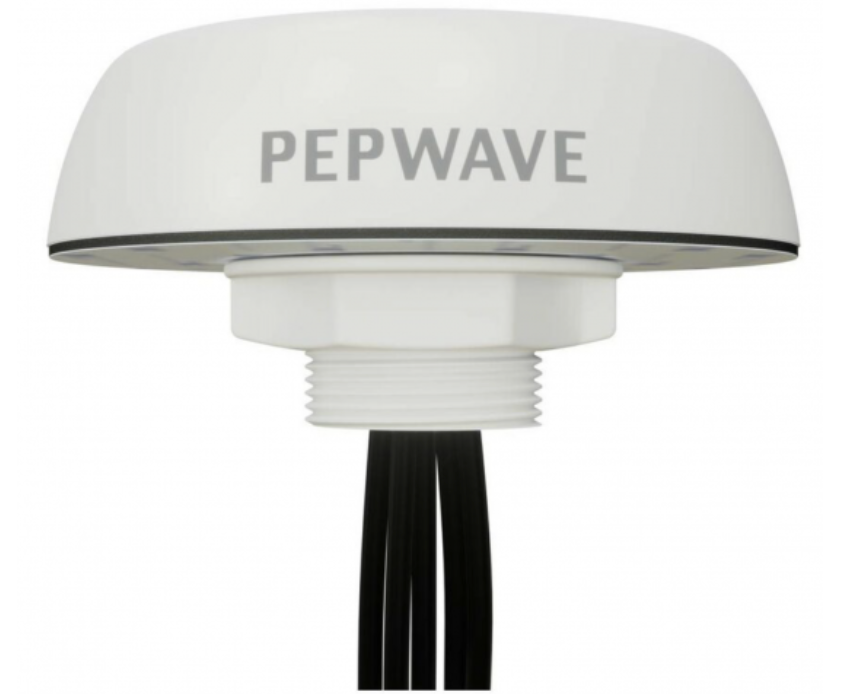
Peplink Mobility 22G Combo LTE/WiFi/GPS Antenna
The Peplink Mobility 22G is a 5 in 1 antenna built for mobile applications. It supports 2x2 cellular MIMO for high bandwidth and solid reliability, dual-band (2.4GHz & 5GHz) Wi-Fi and GPS.
Best
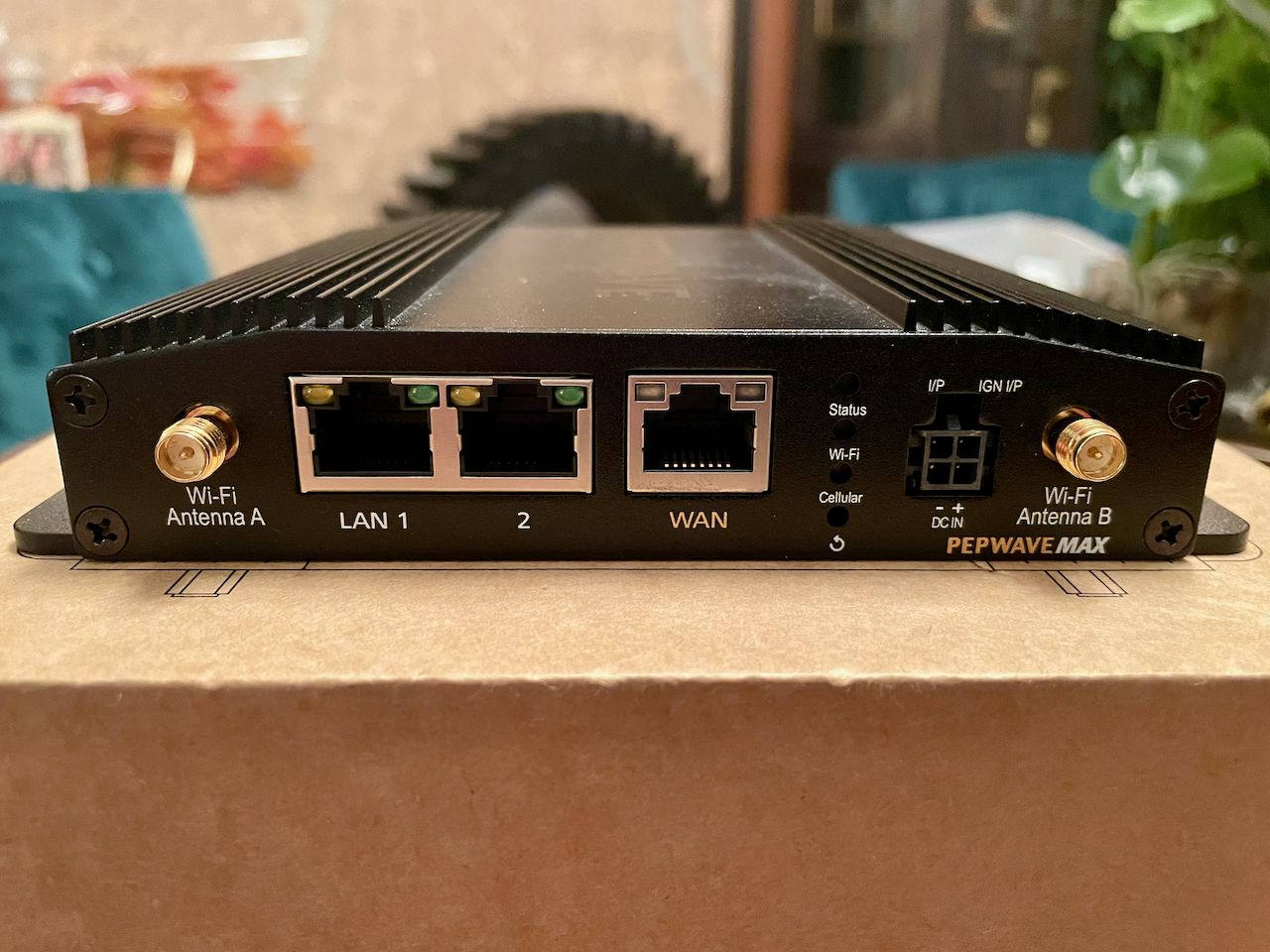
Pepwave MAX BR1 Pro 5G Router
Peplink's Pepwave MAX BR1 Pro 5G Router is a complete highest speed Internet connectivity solution in a single ruggedized metal case for your boat or vehicle.
MAX BR1 Pro 5G – this is the latest and greatest from Peplink and has a very fast CAT20/5G modem in it. It has 4 LTE antennas just for that modem, and two antennas for WiFi along with a WAN ethernet port (for a MikroTik or other device) and two LAN ethernet ports to connect to a computer or switch. It also has a much, much faster CPU which results in way better performance than any of the other MAX Transit line, including the DUO. The only down-side to this product is that it has only one cellular radio / connection, so if you need redundancy or more throughput, you'll need to consider the MAX BR2 Pro 5G.
Steve Mitchell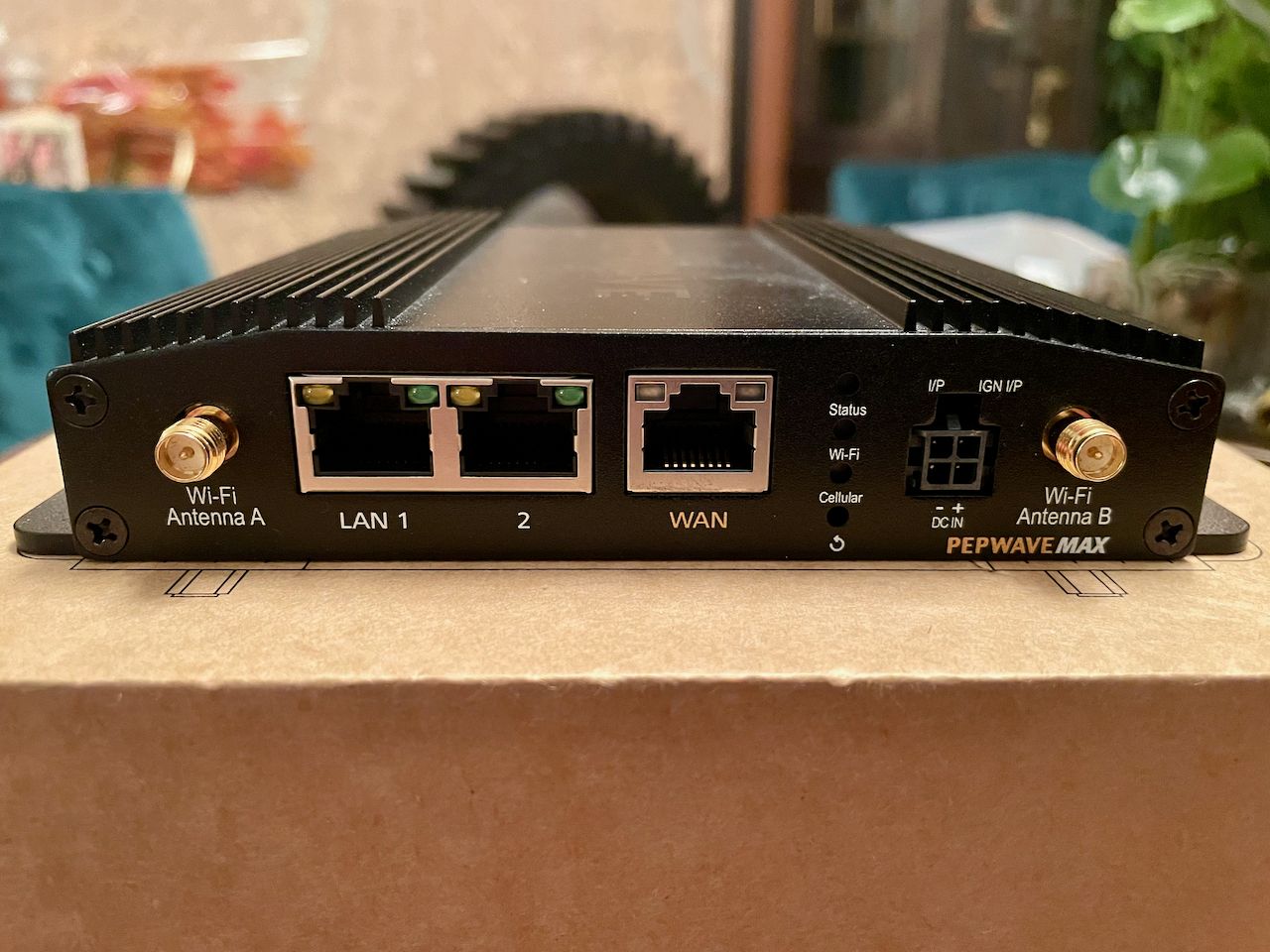
With both of these products I recommend the Peplink Maritime 20G and 40G antennas.
Antennas & Cabling
You can find specific antenna / router combos above, but here are the antennas and cabling I recommend if you already have something.
Peplink Maritime 20G and 40G
The best marine-grade antennas right now are the Peplink Maritime 20G and 40G. They have marine mounts, easy to install, and excellent performance in almost all conditions. You can read my full review below.
Steve Mitchell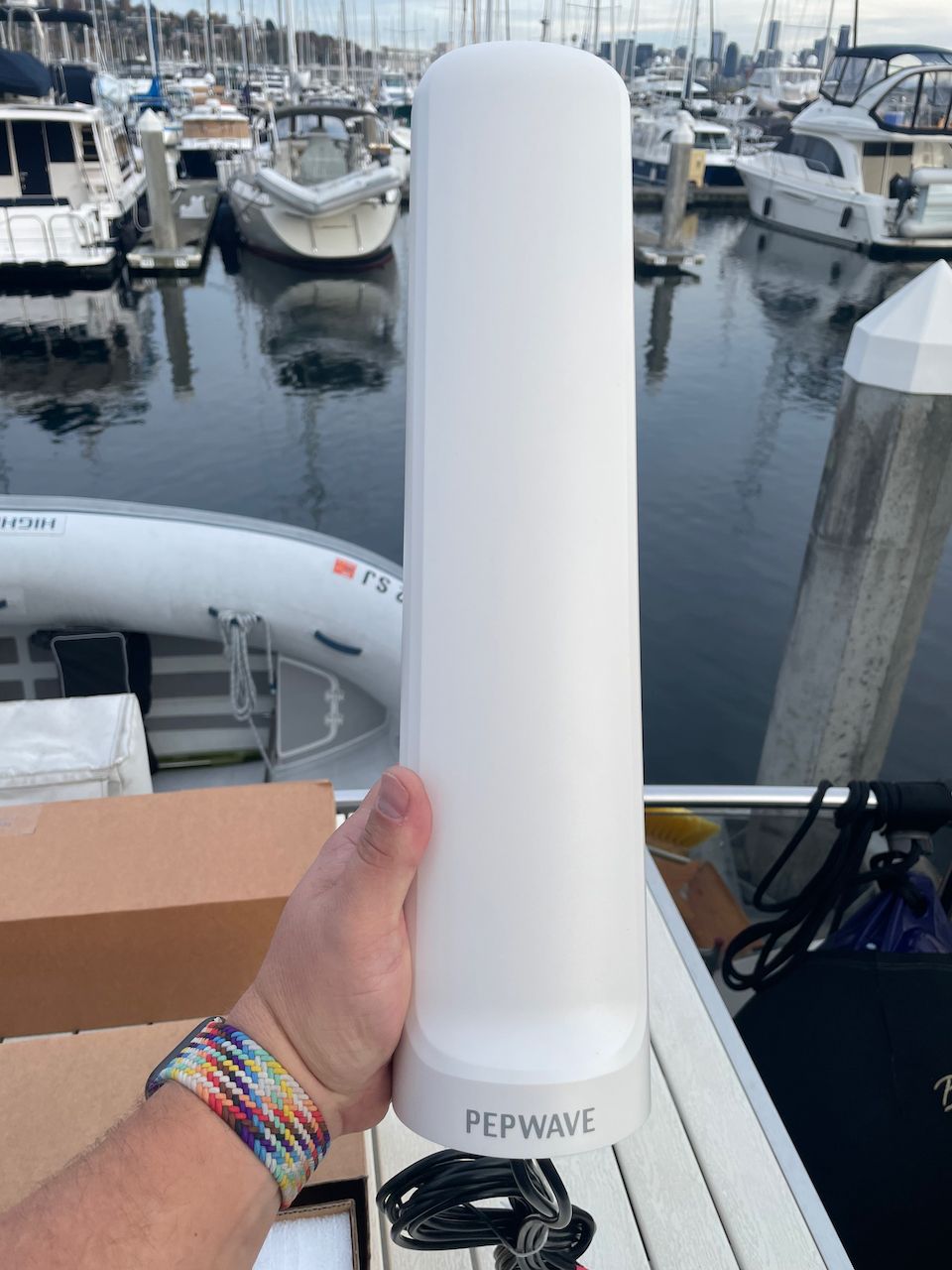
The Maritime 20G is a dual cellular antenna with GPS (2x2 MIMO) that pairs well with a single radio device, or functions as a WiFi as WAN antenna for a dual connection WiFi radio. It can also be used with the MAX Transit Pro E with one antenna connected to each of the dual radios, or to the MAX BR1 Pro 5G to provide more diversity or separation compared to a single antenna like the 40G (see below).
The Maritime 40G is a four cellular antenna with GPS (4x4 MIMO) that fits with all of the dual radio, CAT-18, CAT-20 and 5G products such as the MAX BR1 Pro 5G and the MAX Transit Pro E - both recommended above. This single antenna can connect up to either product and only one antenna is required. It is a big antenna, and you may wish to have two 2x2 antennas (the 20G) instead depending on your performance and aesthetic needs.
Peplink Mobility Series
Peplink came out with the Mobility line about a year ago and they are fantastic performing antennas. In the lower bands/frequencies, they actually beat the Poynting antennas. They're quite a bit smaller form factor, but are a bit more work to mount on a boat.
Steve Mitchell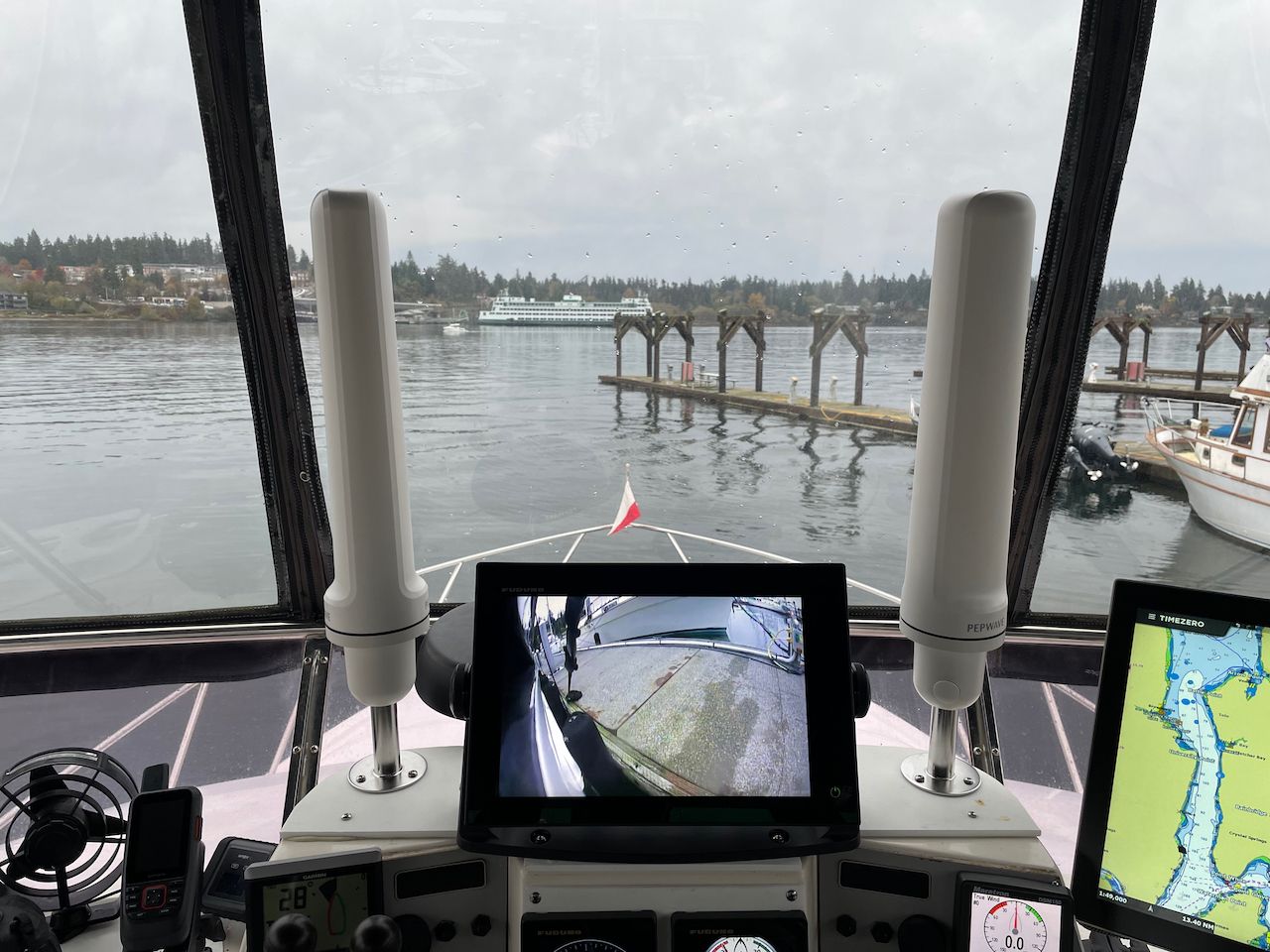
I've seen excellent performance if you do not extend the factory cables that come with them (about 6 feet) which means potentially mounting the router near an outside location.
The Mobility series comes in a number of different options with 2 or more antennas inside. This is great for a single cellular router like the BR1, or you can get two of them for a MAX Transit, and have WiFi as WAN amplified as well.
The Peplink Mobility 40G is a 4x cellular antenna, so a good choice for the MAX BR1 Pro 5G.
- Peplink Mobility 40G - 4x4 MIMO antenna
- Peplink Mobility 22G - 2x2 MIMO antenna
LMR-400 ultra flex cabling
I always recommend using the highest quality cable possible, and as short as possible, to any antenna. My cabling of choice is LMR-400 ultraflex, and I buy it pre-made to the right lengths, with the right connectors from ShowMeCables.com.
WiFi Booster
There is really only one booster I recommend, and it is the MikroTik Groove. It is very inexpensive, quite powerful, but it is difficult to setup and use.
It requires power via the included power over ethernet adapter, or a separate DC adapter. The output from the booster is an ethernet cable which will need to be connected to a router or computer inside the boat.
Steve Mitchell
If you are non-technical, I recommend buying a Peplink router along with external WiFi antennas and using the WiFi as WAN feature. It is quite a bit more expensive ($400 for the antennas alone) but if you cannot deal with technical issues, this is your only choice. Other manufacturers sell simplified WiFi extenders for $500 and up.
Cellular Booster
I rarely recommend boosters anymore because they don't provide as big a benefit as a really high quality outdoor antenna connected to a router. They only really work in areas with very, very low signal levels.
If you are interested in a booster, the weBoost Drive Reach is one of the best out there. You can combine this with a Poynting OMNI-400 for a very robust marine-grade booster setup. More info in my review below.
Steve Mitchell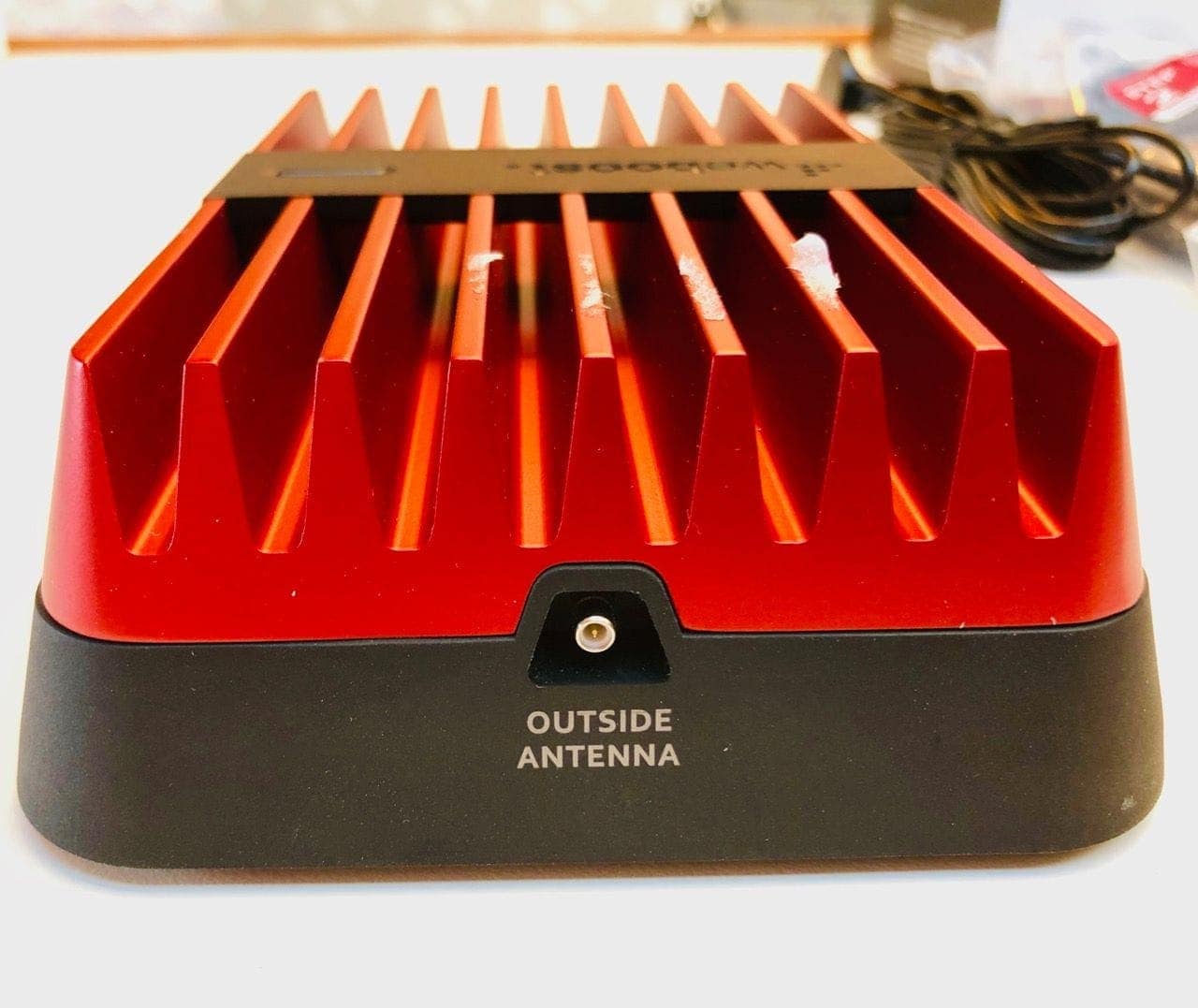
Archived Comments
These are read only comments from the old system. Scroll down to participate in SeaBits Discussions, our new interactive forum attached to each article.
Gary Ryan
March 3, 2021 at 10:23 am
Regarding AT&T, they have a little known wireless internet plan that includes a wireless modem. This plan is $110 per month with 100GB of data and not throttle. I have running on this plan for two years now and it is exceptional in the San Francisco Bay area. I work from my boat and the data up/down speeds have not been issue. We regularly stream video content with no lag.
- Steve Mitchell
March 3, 2021 at 11:10 am
If you have details on the plan or a link to sign up, please post it here or send it to me in email. I’d love to investigate! - Gary
March 3, 2021 at 12:26 pm
Device is here: https://www.att.com/buy/connected-devices-and-more/att-wireless-internet-black.html
Plan is here: https://www.rvmobileinternet.com/gear/att-wireless-internet-router/ - Steve Mitchell
March 3, 2021 at 2:25 pm
Ah yes, I am aware of that plan+device. You have to purchase the device or have that specific device already in order to use the plan associated with it. You can’t activate the plan on another device like a Peplink router or Netgear hotspot, and you can’t move the SIM once you’ve activated it to another device.
It’s a good device+plan if you are specifically looking for AT&T and no other provider, and are OK with the limited feature set in the hardware they provide you. - Scott Christopher
March 3, 2021 at 11:00 am
Steve, I have a feeling I already know the answer, but by any chance are you aware if there is a Peplink device that is or can function as an ‘HD Dome for Wifi’ ? Which I mean to say, a device with an integrated antenna, externally mountable, weatherized, PoE dome or box that can function for Wifi-as-WAN? My research has drawn a blank.
The HD Dome is attractive, in spite of price vs features compared to the Transit series, simply for being able skip the antennas and cabling. I know enough of RF to know that antennas and cabling are more of a dark art than they have any right to be. My personal preference would be to keep the RF signal runs to within devices and ‘convert’ to PoE ethernet ‘digital signaling’ as soon as possible. I figured I would always be struggling with RF cabling for a decent roaming internet system, but the HD Dome tempts me with getting ‘halfway’ (LTE but not wifi) towards not needing the RF cabling.
Or maybe I should just accept that wifi-as-wan is probably not going to end up being all that brilliant anyways and just stick with the HD Dome and LTE alone. I’m sure that the Groove plugged into a port configured as WAN could work, but then you’d loose the single user interface from peplink. And if I have to work with multiple UIs, I’d probably seriously consider rolling my own with pfsense at that that point, since I’m already comfortable with that OS. - Steve Mitchell
March 3, 2021 at 11:14 am
There is no Dome equivalent for WiFi as WAN right now. It’s something that has been discussed at length in the Peplink forums, and I’ve brought it up to my contacts at Peplink as well. It’s definitely on their radar, although WiFi as WAN is definitely a secondary feature set for them – they’re primarily focused on cellular.
The other issue with the Domes is that you also need some sort of indoor WiFi access point, which if you only have one dome, is fine to do with the AP One Rugged. If you want two domes for redundancy or SpeedFusion, as I have, then you need a central router inside the boat which creates all sorts of other issues. Lack of PoE power on WAN ports, three different UIs to manage (2 domes and one router) and a few other issues that I’ve documented in a recent forum post as well.
The bottom line is that Peplink has some work to do with all of these solutions – they need a good, non-antenna focused outdoor marine dual radio dome and a secondary dome option with WiFi only that all feed back to a central router that can manage them centrally. - Tom Crowe
March 3, 2021 at 12:44 pm
Any experience with the RedHat Halo system as a wi-fi extender? where that might fit in your overall discussion here? - Steve Mitchell
March 3, 2021 at 2:31 pm
I think you may have meant RedPort Halo. I played around with one a couple of years ago, but it is 2.4Ghz WiFi only, which can be mostly unusable in marinas (see https://seabits.com/marina-wifi-hard/). In general, most of the 2.4Ghz solutions are pretty equal if they are this same form factor – an outdoor unit with a decent antenna. RedPort paired theirs with a really good 9dB antenna, so it would likely perform very well.
It looks like it is unavailable on Amazon, but was about $400. If I remember correctly, I think it could have been based on the older Ubiquiti Bullet platform which is no longer available either, so perhaps there are some stock issues?
This would fall into that category of WiFi boosters that are more expensive than a MikroTik Groove (which has 5Ghz BTW) – you’re paying for the simplified setup and screens which could be worth it depending on your technical ability. - Owen Anderson
March 3, 2021 at 2:50 pm
Would it be possible to have some kind of summary of what’s changed in your recommendations recently? - Steve Mitchell
March 3, 2021 at 3:03 pm
Do you mean as sort of a change log at the top of the page, or something similar to that? I was planning on that going forwards. Or are you asking about stuff I’ve talked about in the past currently? - Owen Anderson
March 3, 2021 at 3:49 pm
Definitely going forward. I wasn’t clear if there were changes in your recommendations in this page compared to previous iterations. - Steve Mitchell
March 4, 2021 at 9:54 am
Gotcha, yes my plan was to have a bit more detailed info if/when I update any of the items in the list. - Lat Williams
March 7, 2021 at 11:10 am
Just came across your blog, and it looks like great info. We’ve been frustrated with marina wi-fi, and are seeking affordable solutions.
We aren’t techy and don’t need to work while cruising. Just looking for a reliable wi-fi service that gives us internet access, not Zoom or heavy data use. We’d also like to be able to use our smart TV, which is almost useless for us at present.
We use AT&T now, and can use it as a hotspot, but some areas have limited signal strength for AT&T.
What do you suggest for tech-ignorant cruisers who just want to be connected more reliably? - Steve Mitchell
March 8, 2021 at 9:59 am
A dedicated hotspot device like the Netgear Nighthawk M1 is definitely a cost-effective way to stay connected, if that is similar to what you already have. You can add an external antenna like the one I talk about, which will often times work with multiple brands of hotspots. That can help with low signal areas, and in areas with better signal, improve the overall experience.
Right now, the best plan out there is the 100GB/month one from T-Mobile, but depending on where you are in the country, that might not work for you. They have great coverage out here on the West Coast and in particular in the cruising grounds of Puget Sound.
If you want to go one step up, you can try the other routing devices, but they are quite a bit more complicated than a hotspot. - Ian Crosby
March 7, 2021 at 11:18 pm
Word to the wise, if you want the T-Mobile $50/100GB plan, buy the prepaid SIM in the store and make sure you set up your T-Mobile ID while you are there. I could not find a way to order the post-paid stand-alone data plan on their web site. The pre-paid order flow always got stuck before I could check out. And the the phone sales person spent forty five minutes trying to figure out what to do about the IMEI for my PepLink MAX Transit not validating in her system before my call got dropped. The lady at the store sold me an activated SIM in five minutes with no IMEI check or registration. It worked without a hitch when I got it home and plugged it onto my router. (Haven’t installed it on the boat yet). The only thing was that when I tried to set up my T-Mobile account online after getting the SIM home it wanted to send a verification text to the phone number of the SIM card, which of course can’t receive messages. Their phone support guy suggested that I take the SIM out of the router and pop it in a phone to receive the verification text, but of course I’d have to pop the nano SIM out of the mini frame to do that, and then I couldn’t put it back on my router. My only other option to set up an account to automatically reload the SIM is to go back to the store, which I will do tomorrow. A big headache, but a far better deal than any other data-only plan on the market right now.
I went by the AT&T store afterwards to see about adding a second SIM as an additional line on my phone plan, but the caps were low and the prices were ridiculous. The thing is I’ve got thirty gigs of tethered data on each of my devices, so I was thinking about just using those in hot-spot mode where they have decent coverage as secondary data sources via the WiFi WAN settings. Any thoughts on this approach, and whether it would be worth using a signal booster for the phones and/or sharing their data connection via the WiFi WAN configuration in the PepLink as opposed to just tapping into them dorectly?
Pity there aren’t any other better BYOD data-only plans out there right now to fill that second SIM slot. - Steve Mitchell
March 8, 2021 at 10:01 am
Thanks for the feedback. One of the biggest challenges is signing up for a plan. I think I mentioned it in this article, but also in https://seabits.com/t-mobile-100gb-internet-data-plan/ that the safest way to get this particular plan is pre-paid, not post-paid, and online, not in person. Initially when it came out, going into a store resulted in confusion and no plan. Sounds like some places are better in person now.
Trying to combine it with an existing account is going to be very problematic – I’ve heard from a number of folks who have either never gotten it to work, or had hours of time on the phone.
I don’t know why these companies make it so hard! We just want to give them money for data! - Ian Crosby
March 8, 2021 at 10:26 am
I wonder if COVID has caused some of these carriers to dial back or raise prices on their data only offerings in response to high demand? Good to see at least T-Mobile going the other way, even if they don’t make it easy.
On that front: I saved myself a second trip to the T-Mobile store by finding the setting in the SIM Toolkit (Advanced > Misc Settings > SIM Toolkit) in the web administration interface that lets you read SMS messages that have been sent to the SIM!
Using the verification code sent to the router I’ve now been able to set up a T-Mobile ID for my pre-paid data account and save a credit card as a payment method. But now the web site is generating an “Unknown System Error” message when I try to set up an automatic payment to that card. I will try again when I get closer to my renewal date before engaging with their awful account support reps about it. - Gary Ryan
March 8, 2021 at 10:27 am
Does anyone know if Starlink will ever be an option for boats and if so what the timeline for this would be? I got in the beta program but when I looked at the dish and the requirements it was clear that there is no way to make it work on a moving boat. - Steve Mitchell
March 8, 2021 at 10:37 am
I would recommend reading my article on Starlink at https://seabits.com/starlink-is-not-ready-for-your-boat-yet/ - Lee
March 14, 2021 at 7:46 am
Steve
I am interested in installing a mobile connection in my boat and feom reading through your articles seems like the peplinx transit duo is the way to go. I would like to keep it to one antenna. Looks like the peplink 401 will handle all the LTE portion for that router? Does the 401 do wifi as well? If i am not looking at wifi as a priority can the transit still grab a signal with the 6″ antennas provided with the unit or is external really needed? From your info looks like two 201 antennas would be the next option for the least antennas. In this case does one of the antennas wifi cables not get used?
Lee - Steve Mitchell
March 14, 2021 at 9:19 am
Hi Lee,
The Peplink Puma series of antennas (https://www.peplink.com/products/puma-series/) comes in a few different versions. There isn’t one that does 4x LTE as well as WiFi, and there’s a reason for that. Most of those types of antennas, like some from MobileMark, are not going to be that great on a boat. These are typically called “puck” antennas and they are meant for cars and trucks in metro areas, such as police and EMS. They don’t have higher gain bits in them, so they won’t work on a boat rolling around in some anchorage further away very well at all.
With the models of Puma available, you could use a Puma 401 for the 4x LTE connections, and a Puma 020 for the 2x WiFi connections. Or two Puma 221s which have 2x LTE and 2x WiFi – sort of wasteful for the second one with WiFi, but it would separate out your LTE and maybe allow some more diversity.
The Transit might be able to grab remote WiFi signals without an outdoor WiFi antenna, but it won’t be anywhere near as reliable. It also highly depends on where you mount the router and what is around it in terms of interference. Keep in mind as well that by using the on-board WiFi to grab a remote signal, you slow down the performance of your local WiFi network that the Peplink is creating. Some folks add an AP One Rugged if they have coverage or performance issues to broadcast their local WiFi network. - Lee
March 14, 2021 at 1:32 pm
Steve
Thanks for the responce. Are the puck antennas more of an issue on boats just for wifi or also LTE? - Steve Mitchell
March 14, 2021 at 1:50 pm
Puck antennas in general are not great on boats because of their lower gain. Many also require what is called a ground plane which is a big piece of metal or grounding material which is really hard to do on a boat without making things look really ugly. - Jon
May 2, 2021 at 9:01 am
Should one expect significantly better afloat performance from a Poynting MIMO-3-15 than a Pepwave Puma-221 in this case? The latter form factor would work better for me, but perhaps the performance would justify additional complications. Either would be connected to an existing Max Transit being used for LTE and WiFi as WAN upgrading from a mix of older internal (WiFi) and external (LTE) antennas. - Steve Mitchell
July 17, 2021 at 1:01 pm
I’ve had very good results with the Puma 421 and 401 series antennas, which are derivatives of the 221. They have excellent performance in the lower bands and are pretty small. They don’t have great marine mounting setups though. The key is to not add any extensions to the existing cables on any of these antennas, Poynting or Peplink – otherwise you add quite a bit of loss.
The Poynting MIMO series has been hard to get a hold of, and I haven’t tested it yet. They don’t seem to be as good as the Peplink ones, though, on paper. - Jon
May 3, 2021 at 11:10 am
Taking the gain and profile issues into account, should we expect a significant difference in afloat performance between a Pepwave Puma 221 and a Poynting MIMO-3-15? I already have a MaxTransit router and am looking at updating the antennas for LTE and WiFi as WAN purposes. The Puma profile would work better for me, but the complications of the fin might be worthwhile for a significant performance boost. - Steve Mitchell
May 5, 2021 at 9:53 am
The Pepwave Puma antenna has really impressed me – I have three that I have been testing for quite a while, and it has done extremely well in very adverse signal conditions. The Poynting MIMO 3-15 and other variants has lower gain numbers, and while I have not had as much time testing it, I would say that the Puma would be my choice right now given the performance it has been showing. - Lee
March 14, 2021 at 2:19 pm
Got it. Thanks! - Gavin Gee
May 6, 2021 at 11:27 am
Steve do you think I will see an improvement over my tethered Iphone 11 on TMobile in elliot bay marina with the good options listed here? I dont want to get into the $1500 price point but want more reliable data than the 1 bar of Tmobile I get on the phone. i.e. is a cat 6 modem based unit going to be an improvement over an iphone 11 which I believe has a cat18 modeM - Steve Mitchell
July 17, 2021 at 12:31 pm
It’s not just the type of modem, but the quality and size of antenna. The higher/newer category modems do help in situations where you want more bands connected simultaneously to help with the signal strength, or where a carrier, like T-Mobile, spins up new bands that work better.
T-Mobile is pretty bad in Elliott Bay Marina. I have been testing a new 5G product from Peplink and it works phenomenally better than ever before, but I suspect that is because those are new bands, and few people are on them yet. - Gavin Gee
July 17, 2021 at 12:52 pm
Thanks Steve. I did buy a poynting wifi antenna for my mikrotik from miltech based on your experience and it’s a great improvement. That is giving me confidence to explore the poynting lte Antenna and setup as well. - Larry OKeefe
June 18, 2021 at 6:40 am
Steve, really appreciate the recommendations and research behind them. I have a Pepwave Max BR1 Mini that I got on the way down to Mexico to replace the dead cellular part of an old Wirie+ unit I’ve had for several years. I continued to use the Wirie+ for marina wifi while using the Mini with an external WireEng 4g antenna mounted on the top of the pilot house. Now the wifi part (Bullet) of the Wirie+ is dead, and I am wondering about using the Mini for wifi, too. I’d have to unlock the wifi as wan feature on the Mini for $100, and would probably buy the recommended Poynting Wifi antenna.
My questions to you, if you don’t mind:
– How good/usable is the wifi as wan module on the Pepwave products? Is it easy to scan for and connect to wifi networks?
– Would you recommend upgrading to the Poynting dual cellular antenna? I assume that I’d then need to run an extra cable?
– Any suggestions for extending/improving the strength of the wifi network created by the mini? There isn’t a “local” wifi antenna connection on the device.
Thanks in advance! - Steve Mitchell
July 13, 2021 at 8:34 am
Hi Larry,
The WiFi-as-WAN feature is very easy to use in the Pepwave. I use it every day, and it shows up as just another WAN source, allowing easy prioritization and such. Looking for a WiFi network is very easy, and you can sort them by open or secured, along with saving favorite ones. I find it to be a good interface with a decent amount of options.
An alternative would be the MikroTik Groove, which I write about a decent amount. It is much more difficult to use, but is very powerful, and is about $90. That would connect to the WAN port of your BR1 and it has its own integrated antenna, and is powered off of PoE into the ethernet port, so easy cabling – might even drop into where you had the Bullet.
The Groove is difficult to use though, and can be frustrating, so check out some of the articles here on it first.
WiFi-as-WAN will also reduce the WiFi performance on the BR1 depending on the model you have. Many of the BR series only have two WiFi antennas – one for 2.4Ghz and one for 5Ghz – and when you use WiFi as WAN, you cut the performance of both or one of those in half. It won’t reduce the signal that much, but just the performance.
If you connect outdoor antennas to the WiFi ports, then you could have issues with things inside depending on where those antennas live. Most customers I work with I end up recommending a MAX or BR1 as the main “WAN” unit that does LTE/cellular, WAN port, and WiFi as WAN, and does not actually broadcast a WiFi signal. Then we pair it with one or more AP One Rugged units which are WiFi only and are managed by the BR1/MAX and placed in places around the boat that make sense. That also means the router can be closer to the outside, shorter cable runs to outdoor antennas, etc.
For the LTE side, the Poynting series of antennas are excellent. - Larry OKeefe
July 14, 2021 at 11:39 am
Thanks, Steve, that is very helpful. It turns out that I somehow had a software key for the wifi as wan option and was able to get the license key from Peplink support. I agree that it is easy to use. But, given the antenna configuration that you describe, I do not think it would work very effectively with my external wifi antenna. I do have another wifi router on board that I use for nav equipment, but I think that should be kept as dedicated. I will look into the AP One units. - Brian
June 20, 2021 at 11:03 am
I’m a little confused, I have the Netgear Nighthawk hotspot, is there any signal benefit to getting any antenna other than the Netgear MIMO antenna with this device? Also, I have the t-mobile plan you mentioned was retired, do you know if existing customers will be able to keep it? I haven’t seen any notifications yet but don’t want to ask! - Steve Mitchell
June 21, 2021 at 10:03 pm
Hi Brian,
The little square MIMO antenna is a good one, but if you are having issues in more remote areas, you could get a Poynting OMNI-402 and conversion cables to plug it into the two ports on the Nighthawk.
I’m not aware of T-Mobile cancelling the plan if you already have it. Just make sure you don’t miss a payment or have a credit card issue or anything. In many cases with pre-paid plans (if that is the version you have) one missed payment will render the plan dead. - Brian
June 22, 2021 at 7:58 am
Thanks for the info. I got the Netgear one yesterday, I’ll try it out shortly, and hopefully that is sufficient. I definitely appreciate the info you post on the site, it really helps clarify what is otherwise somewhat overwhelming! - Ian Crosby
June 21, 2021 at 10:09 pm
I just picked up the ATT prepaid SIM at their store in Sitka and was very excited to drop it in to my Max Transit. So far though it is only connecting at 3G speed even though I have four bars of LTE on my ATT phone. Are these the “data issues” you were referring to? - Steve Mitchell
June 22, 2021 at 8:16 am
Hi Ian,
No, that’s either coverage or something else going on. The issues that are happening appear to be around the data connection hanging every so often, either requiring a re-connect or sometimes just waiting. - Ian Crosby
July 3, 2021 at 8:32 am
Yep, I got it sorted out by manually associating my router IMEI number with the SIM through the AT&T prepaid account site. (The rep in the store said this step would not be necessary.) I have had to manually reset the connection a few times but generally the coverage and availability was quite good throughout SE Alaska. This was a total lifesaver for me after I failed to read the fine print on my T-Mobile prepaid plan and discovered that their Alaska “partner” coverage is classified as domestic roaming and capped at 128 MB before throttling! I also picked up a GCI prepaid SIM that was next to useless as most of their coverage in SE is voice and text only. - Steve Mitchell
July 9, 2021 at 9:13 am
Good to know! TMO is generally only usable roaming wise in Canada. SE Alaska is a challenge for them, and AT&T or just going direct to GCI is the only choice I’ve heard of working enough to be connected. Still limited in terms of bandwidth and locations, but it is better than the alternative! - Nick Anderson
June 27, 2021 at 8:02 am
Hi – what is your opinion on the use of something like the MOFI4500-4GXeLTE-SIM7 that directly uses a cell carrier SIM from an existing phone (not hotspot)? I have heard that this form of router allows the use of unlimited cell plans for phones (from the likes of AT&T) as the carrier sees it as a “phone” and not a hotspot.
I’m assuming that you can’t simply stick a SIM from an unlimited cell-phone plan directly into something like the Pepwave MAX BR1 MK2 CAT6 router and have it work as the carrier identifies the hardware differently? - Steve Mitchell
July 9, 2021 at 9:23 am
Hi Nick,
Pretty much all routers, including the MOFI stuff, shows up as a router, not a cell phone. In order to show up as a cell phone to the provider, they would have to fake looking like a phone and do a lot of other stuff that would get them in a ton of trouble. All of the products out there get their “modems” or cellular connections from a few vendors, and they have to set them up a particular way to even access the network.
You are correct, though – many carriers and routers will not allow you to just move an unlimited SIM from a phone into the router without them noticing. Some will work just fine depending on the plan, while others will slow down or not even connect as they notice what you’ve done. T-Mobile did this with some of their plans last year, and specific modems from a company called Telit.
However, there are plenty of examples where using a cellular phone plan in a router works fine too. It really comes down to the SIM, plan, and the router you’re going to be using. What doesn’t exist is a router that will bypass all of this and look like a phone… - Richard
July 3, 2021 at 7:14 am
Everyone should be aware that SpeedFusion is turned off after one year unless an extra annual subscription fee is paid. Steve, would you still recommend Pepwave Max routers without SpeedFusion? - Steve Mitchell
July 9, 2021 at 9:20 am
SpeedFusion does not get turned off. I think what you’re referring to is the SpeedFusion Cloud requirements for a plan and warranty.
SpeedFusion Cloud is a paid plan that is set by date and amount of data you use. Once one of those runs out, you have to add a new plan. Last I checked, it was something like $50 for 2 terabytes, and lasts a year, but it can vary by device. This is why I recommend folks don’t send everything out SpeedFusion Cloud, and this particular plan usually will suffice for a year. That’s pretty cheap when you consider what you’re getting for it!
The second is device warranty. Peplink is starting to enforce that you have the product under warranty to use their cloud. They’ve done this for years with their remote management suite InControl, and the Cloud part is also required to have a valid warranty. This allows them to make sure you’re using supported and modern hardware with the Cloud, among other things, and is pretty common in any tech industry. You can get Peplink products that include this via their SmartCare program, and vendors will often offer a 3 year warranty when you buy it.
SpeedFusion still works without SpeedFusion Cloud and without the warranty. Nothing gets turned off in the product that I’m aware of. I use SpeedFusion to another Peplink device, and to a Peplink virtual router in the cloud, and have for many years prior to SpeedFusion Cloud being a thing. If you want the convenience of their Cloud and support, then you do have to have a plan and warranty.
Compare this to the other vendor in this space, which I do not recommend at all because of their policies – CradlePoint. They require that you pay a software licensing fee every year, which can be well over $500, or features within the product are disabled. Some of these features can include the actual cellular radio which means you can’t even use the product standalone!
Peplink’s cloud fees are pretty cheap, and their warranty is also usually $100 or less per unit (depending on the model of course) and gives you access to their cloud, but also access to InControl which is an amazing tool if you’ve never tried it. - Paul
July 7, 2021 at 2:07 pm
Steve, thank you so much for providing this wealth of information. It’s the most useful resource I’ve found. Have you looked into Neptulink? Do you have any opinions on it? - Steve Mitchell
July 9, 2021 at 9:25 am
Hi Paul,
I did look into it in early 2020, and was surprised at some of their antenna claims. I did contact them, but never heard back as to my specific technical questions. I would want to know a lot more about the solution and how it gets to those numbers before buying anything. - Wm Jones
July 16, 2021 at 7:45 am
Data regarding available cell plans is dated both AT&T (100GB/$55/month post paid) and T-Mobile (100GB/$50/month pre-paid) offer 100GB/Month hot spot plans. T-Mobile even tosses in a modem for free (for a two-year obligation).
I followed a RV connectivity group “on the Facebook” (LOL) to get up-to-date info on offerings and pulled the trigger when the unlimited 100GB offerings came ’round.
I am a sailor but am using a Netgear M1 and a M5 to work from home while I select a carrier. Later it will be Chippie and Digicel. - Casey Tallon
July 20, 2021 at 2:22 pm
Steve, Great info! Do you know if the Netgear Nighthawk M1 will still work with the prepaid AT&T plan since it’s 5G? - Steve Mitchell
July 22, 2021 at 11:34 pm
It will most likely fall back to 4G, but it really depends on the plan. I assume you’re referring to the $50/month prepaid hotspot plan that they just came out with recently? I don’t know of any restrictions with that particular plan outside of devices that AT&T supports… - Helmsman
August 25, 2021 at 2:31 pm
https://www.milltechmarine.com/Poynting-MIMO-3-17-LTEWiFiGPS-Combo-Antenna_p_643.html
Is the above multi-antennae something that would work well for your setup with the Max Transit. Seems like it receives both cellular and wireless signals? I appreciate any insight you can provide. - Steve Mitchell
August 27, 2021 at 11:58 am
Multi/combo/puck antennas do not generally perform well because of their size and the number of antenna elements inside them all competing for space. In almost all cases, the bigger the antenna, the better the performance.
I’ve tried to get the Poynting MIMO-3 series to test, but have been unable to. There is data to support that it won’t be as good as larger antennas, though.
I have been using the Peplink Mobility (used to be called Puma) series of all-in-one antennas and have been very pleased with their performance even compared to a Poynting OMNI series. I’m still doing testing with a couple of newer models, and will share that info soon. - NHarrison
August 27, 2021 at 9:47 pm
Thank you. I have to make a decision in January. Look forward to your thoughts, I appreciate the huge effort you put into all of the testing you do to benefit all of us. - Ash
September 14, 2021 at 5:59 am
Hi Steve – Very helpful information on your site.
My requirements are fairly simple and primarily consist of internet access for music and kids YouTube while cruising of a weekend. That said, I like to buy quality equipment and future proof as much as possible. Where we spend most of our time, the 4G signal is weak and barely usable. 5G is just being deployed and I should have “ok” coverage in 12 months.
I was planning to order a Max Transit 5G, but have been advised that there is a shortage of stock and the ETA is likely to be 6+ months. As an alternative, the supplier has offered a BRI Pro 5G which is almost 2x the cost. Is this a good option, or would I be better using a Max Transit Duo and leveraging SpeedFusion?
Also, any views on the Pepwave 40G Marine antenna?
Thanks,
Ash - Steve Mitchell
September 14, 2021 at 8:51 am
Hi Ash,
I would be wary of 5G being stronger than 4G – if you already have weak signal on 4G, make sure they are actually investing in 5G in that area. It’s pretty typical for 5G to follow 4G coverage, so that could be a concern.
The choice you’re trying to make is one I get asked about frequently, and it’s because the MAX Transit 5G and BR1 Pro 5G aren’t easy to choose from.
The MAX Transit 5G has a worse WiFi radio than the BR1 Pro 5G which is disappointing. However, it does have WiFi as WAN, which is a commonly used feature on boats, while the BR1 Pro 5G does not. The BR1 also has a better CPU which allows it to do more in general.
The bigger challenge is that a more enterprise or flagship product in the MAX Transit 5G is CHEAPER than the BR1? All I can assume is at some point Peplink will come out with a refreshed MAX Transit that will have a similar or better CPU, but I don’t know when.
I also don’t know if the modem in both of these is the same – the global version (not US) has the same band support, but that doesn’t mean they’re identical. My testing with the MAX Transit 5G has not been that impressive so far.
As to whether you want a single or dual radio, that is dictated by your need for always on connectivity.
The Pepwave 40G Marine Antenna looks amazing on paper – the best antenna out there. I hope to have some soon to test. - Ash
September 20, 2021 at 11:45 pm
Steve – There are availability options on the Duo, so I have settled on the Max Transit CAT18. Would I be best with one 40G antenna, two 20G or something else?
My boat is not that large (31ft cruiser), so I am concerned that a 40G may look pretty odd. - Steve Mitchell
September 21, 2021 at 6:19 pm
Hi Ash,
Having two separate antennas is always better for diversity and performance. However, it might be good to look at the 40G and 20G specs to see the differences. From what I remember, the 40G had excellent performance in the lower bands which are important on the water, and the 20G slightly less. - Ash
September 14, 2021 at 6:55 pm
Thanks Steve.
If I was to go with the Duo, would the 40G antenna still be suitable? - Tricia
September 20, 2021 at 11:38 am
Steve – as others have said – thanks so much for sharing all of this great information. I am trying to set up the modular, cheaper boat internet you wrote about back in May, 2018. We have a Mikrotik Groove that we use to access marina wifi. For cellular access, the Netgear LB1120 you recommended back in 2018 appears to no longer be available. Can I use the Netgear Nighthawk M1 hotspot like the LB1120, i.e. connect it directly to my onboard router via ethernet? If not, do you know if there is a current replacement for the Netgear LB1120? I am fine with manually switching between marina wifi and cellular by changing the input to the router.
Thanks again! - Steve Mitchell
September 21, 2021 at 6:25 pm
Hi Tricia,
There is a new model called the LM1200 that appears to be the upgrade to the LL120. I’ve not tested it myself, but it has similar properties to the original one. If you wanted something a bit more flexible, I would definitely consider the Nighthawk. There is a 5G version I am just now testing that has an ethernet port on it (expensive though) which I will be writing about soon. It could be used in the same way, but also is a WiFi hotspot itself just in case other things fail. - Tricia
September 24, 2021 at 6:58 am
Hi Steve – I purchased the LM1200 and an ATT 100GB prepaid data plan. The LM1200 will not connect to the ATT network. ATT is telling me that the LM1200 is not compatible with ATT even though the LM1200 literature says it is certified for use with ATT. I also bought a Nighthawk hotspot so I might try that next. - Tricia Evangelista
September 24, 2021 at 6:40 pm
The Nighthawk MR1100 that I purchased on Amazon also did not work with the ATT SIM card they gave me. ATT said it was a Netgear problem while Netgear said it was an ATT problem. I went to another ATT store and bought an ATT branded Nighthawk MR1100 which finally worked with an ATT 100GB data plan sim. Took more than ten hours but looks like we will have internet as we head south this week. Thanks again for the great info! - Richard
September 29, 2021 at 10:55 pm
Steve
Thanks for all the info. I’m trying to create a high end system for my boat, allowing wifi and cellular (several carriers) using wifi to distribute to boat guests. As automated and seamless as possible prioritizing the fastest connection.
The hd1 dome looks like a good answer. Since it’s a single radio device, would I want two? How connected?
I use a sim injector then ?
And a max transit to add the external wifi? And create my wifi lan? With one or two 496 antennas?
To extend the wifi in the boat, what are the remote access points?
Is a wifi booster necessary? Suggestion?
Am I missing anything here?
Thank you - Steve Mitchell
September 30, 2021 at 3:37 pm
Hi Richard,
I assume you might also be the same person who has emailed me privately. There are a lot of questions in your post above and it would really depend on your use case, budget, and technical ability. If you’re not the one who has reached out, please do by using the contact page on my website as this seems more like a consulting discussion.
Archived Community Comments
These comments were posted on the SeaBits forum before February 2026. Scroll down to join the current discussion.
I have had the Peplink Max BR1 and the Cradlepoint IBR900. The Peplink was not very reliable for my on my boat, with an external antenna on a 70’ mast, with or without a cellular booster, so I tried the Cradlepoint IBR900. It worked ok, but, as others have noted, you lose most functionality if you do not pay Cradlepoint $180 a year for a license. I then bought an Inhand IR300 (https://www.amazon.com/dp/B096XRZZ7J/ref=pe_386300_440135490_TE_item?th=1) for $168 on Amazon. It works great, has dual-SIM capability, and has no licensing charges. Inhand does have cloud-based management available, but I am keeping management strictly local. I can even send it an SMS to have it send me its current status and IP address (and even limit which phone numbers can ask it for status). It also supports Ethernet WAN, so I can have it automatically use a wired (Comcast XFinity) connection when at my berth at the marina. I am currently mainly using a T-Mobile LTE SIM, but also have an AT&T SIM at present. Both work, although I may try a Verizon SIM in place of the AT&T SIM for lower cost.
Thanks for posting this information, Steve. It helped sway my decision to move from Mikrotik to Peplink. I’m curious, however, how you were able to set up combining the bandwidth of 2 sims with the Pepwave MAX Transit Cat 18. In my Pepwave admin set up, I have selected both sims (sim a is AT&T and sim b is T-Mobile) in the cellular settings with no preference set, but in my dashboard connection status, I see that only one sim is in use at a time.
Hi @glenlowe,
The MAX Transit CAT18 is a single modem or cellular connection device. While it has two SIM slots so you can switch back and forth, you can use them both at the same time.
The MAX Transit DUO, or some of the other bigger routers like the MBX line have multiple cellular modems and can have them connected simultaneously. Those get quite a bit more expensive, though, and are usually for folks who need 24x7 connectivity no matter what.
This is OT but any recommendations for Canadian cell plans for Pepwave gear? Leaving Shilshole for BC and looking for prepaid / postpaid data plan instead of roaming on Verizon and T Mobile.
The best solution I’ve used, and recommended to others, is Google Fi. It uses the T-Mobile network in the US mostly, and roams on several Canadian providers. I’ve used the Unlimited Plus plan which was just upgraded to 50GB of data a month, and that includes roaming too which is much higher than just about anything out there.
Just be careful about how many months you use it consecutively. I’ve heard of them canceling plans due to terms of service if you roam constantly. You also will be throttled or slowed down after the 50GB data amount, and that can be a red flag as well if you use all of your roaming data constantly.
I have a T-Mobile SIM that came with a ‘Franklin’ hotspot device that I got at one of their stores. Does anyone know if I can use this sim in the equipment cited in this article and discussion, for example Nighthawk or Pepwave?
Also, any updates for 2022?
thanks!
Most all of T-Mobile’s plans aren’t locked to a device, so it could work on another device. The only challenge will be related to the plan itself that you bought the device with. Most of their hotspot plans aren’t device specific either, which means it should work. An easy way to test is to try it in another device and see if things still work.
thanks Steve. Is the Nighthawk still your recommendation for an entry level, sub-$500 solution for cell internet via one sim or marina wifi when available?
The Nighthawk is still my recommendation for a hotspot device with a single SIM. It won’t work with local marina WiFi, however. You’d need a Peplink or other similar router with WiFi as WAN if you wanted to do that.
double thanks, Steve. I did not realize that about the local marina wifi. I looked at Peplink Max BR Mini and see that you can purchase an upgrade to unlock the WiFi as WAN capability (great). However, I got confused re: the different category modems avaialble. Can you please point me to something that explains these? (I do not need to be on the bleeding edge . . .)
Generally speaking you want to go for the newest category or most inclusive set of categories possible if you intend on using the device for as long as possible. For the BR1 Mini, I would get the newest device that has CAT7 support. This includes support for Band 71 with T-Mobile which is important for longer distance connections, like on a boat. The cheaper ones with slightly older bands are only $50-100 cheaper - not really worth that if they are that far behind tech wise.
Hi Steve - from your latest blog post it sounds like you’ve been spending some time this summer in Canada. Do you have any new recommendations for cellular data plans for folks splitting time between US and Canadian waters in the Salish Sea?
Roaming in Canada using a US carrier has always been hit or miss, but this last year it got worse than it has been the last few years. All of the providers have reduced the amount of roaming data you can use across just about all of their existing plans.
Google Fi and/or T-Mobile seem to be the best choice right now for roaming if you’re looking for a new plan, but there have been wildly different reports from users. I’ve been using both T-Mobile and Google Fi with good results, but some folks have reported very poor performance or being cut off early in their data amounts.
Generally speaking, and it seems like a lot of people have forgot about roaming (maybe because of not being in Canada during the pandemic), roaming is always a crap shoot, and usually only usable for emergencies. That hasn’t changed - if I were only able to use cellular in Canada, I would use it just for basic browsing and access, and would have to rely on local WiFi for any sort of streaming or remote work.
Thanks Steve. I am looking to set up a Starlink + Peplink system to enable boat-bound work (esp Zoom), currently leaning towards MAX BR1 Pro 5G as the router. So looking for a plan that is just gap-filler/failover for Starlink. Our family phones are all on Verizon - we’ll look at Tmobile and Google-Fi.
The MAX BR1 Pro 5G is a great router to pair with Starlink. I’m in the middle of testing it’s slightly bigger brother, the MAX BR2 Pro 5G, which has dual cellular radios and a bunch more physical ports - might be overkill for what you need though.
With as volatile as Starlink is in terms of use cases, mounting, and plans, combining cellular with Starlink is a great way to go!
HI Steve, I received my Max BR Mini and it works great. I have two questions:
1 what remote antennas would you recommend to install to get better marina wifi reception? Right now I am just plugging the peplink in on my flybridge but I would like a more permanent solution?
2 I mostly use local Wifi with the peplink, but i have a backup tmobile sim inserted for when I cannot get marina wifi. the issues is that i would like to have my devices treat the Peplink like a metered connection when I am on Tmobile because all of the media onedrive synchronization eats up my mobile data in a heartbeat. Is there any way to do that? Have a second virtual AP that only uses the t mobile, for example?
The best antenna right now to use is the Peplink Maritime 20G antenna with these RP-SMA Male converters. You could also use the Peplink Mobility 42G Combo antenna if you wanted both WiFi and LTE. The 42G is not as good as the 20G, and it is smaller, but it depends on your space and desires.
Probably the best way to deal with this is to leverage things from my Managing internet usage on your boat article and unfortunately some manual intervention. In particular I would look at QoS and bandwidth control. You could set the non critical devices to have hardly any bandwidth percentages, and the important ones with higher percentages. You need to make sure that your internet connections have correct settings for their upload/download numbers so those percentages work, though.
I do something similar when I’m connected to remote WiFi, and for updates, Dropbox/OneDrive, and the like, I use the metered connection settings in Windows 10/11 to manage it. I also use Low Data Mode in iOS and turn it on and off depending on what I’m connected to.
There are more automated ways of potentially handling this, but it requires some more complex firewall rules along with priorities and such to try to catch the “bad” traffic when using the slower connection. The challenge is that systems like OneDrive and the like can change how their traffic looks as they release new features, and figuring out how to block it or slow it down can change quickly.
Hi Steve –
I love your research and writing! Thank you! We are taking over a 50’ monohull this summer in Europe with plans to take it around the world and we’re trying to figure out a cellular connectivity solution for it. We have a 15’ antenna mast on the transom and are thinking about a Max HD1 Dome Pro, either on that mast or on the first spreader. A few questions:
Do you have any experience or perspective with the Max HD1 Dome Pro?
We’re thinking that a 20’ minimum antenna cable run would defeat the purpose of a separate antenna (like the 20G) on a cheaper router, but would love your thoughts there.
I see that they now offer a mini SIM injector as well as the regular. Would the mini work for us?
Have you heard anything recently about Peplink supporting eSIMs?
Thanks in advance!
Adam
Hi Adam,
Congrats on the new boat and adventure!
The HD1 Dome Pro will work around any antenna length cable issues. I’ve tested it and it is a very nice product, very similar to the HD1 Dome I reviewed a couple of years ago. They have been around a number of years, and I used them extensively on my on boat for several years. The Dome Pro has a WiFi radio in it, which is a new feature, and of course the 5G radio.
Not sure I understand your question on a 20’ antenna run?
The mini SIM injector could definitely work for you if you are using the dome.
There are some random Peplink products that support eSIMs, but for very specific reasons. Their general routers do not as far as I am aware.
Hi Steve –
Thanks for the quick response! The “20’ antenna run question” was asking if the combination of a discrete router and an antenna could be a viable alternative to the Max HD1 Dome Pro, or would the loss from a 20’ cable between the router and the antenna make this not feasible.
Also, reading your posts from a few years ago, it seems that you were having lots of problems with the SIM Inserter. Have those issues since been resolved?
Adam
20’ from antenna to router isn’t a problem at all. That’s what I have right now for my two antennas, and that is the rule of thumb length-wise that I’ve used for 100’s of installations. In many cases, the router is put nearer to the antennas specifically to keep that length down, and then an access point for WiFi is used closer to where people will be working from.
The SIM injector had some issues early on, but it is a lot more reliable now. It’s still a bit different than using a real SIM card, and requires some futzing there if you change things a lot, but otherwise works well.
Super helpful! Thank you!
Hi Steve, I’m hoping you can help me with some advice about potentially using different antennas for a 2x2 MIMO - but before I do - I really appreciate your site and your topics, you’ve inspired me to put an RPI in my boat, though a topic for another day…
Here’s my situation - I’m setting up a local internet capability on a cruiser boat being used in the Great Lakes, Canada. Our goal (my wife and daughter’s goal) is connectivity in areas where cell coverage is weak, we’re less focused on high speed / Netflix streaming. For those who are familiar - we’ll be making trips through the North Channel - north of Manitoulin Island.
I’m looking at an RUTX11 or Max BR1 Mk2, so I’ll have 2 Wifi and 2 LTE (CAT 6) antenna ports. Here’s my dilemma for LTE: connect both ports to a 20G for MIMO … OR… connect 1 port to a higher gain / longer range SISO antenna (like a Poynting OMNI-400) and the other port to a much smaller puck style antenna (22G or PUCK-5)… Best solution would clearly be 2 high-gain SISO, but I don’t have the room! Do I create an issue if the 2 LTE antenna’s aren’t equally capable?
I’m less focused on the Wifi as WAN, but do intend to take advantage of the capability with an OMNI-496 (the only other space I have for antenna) and the other port connected to the same puck style antenna… And, of course, GPS and redundancy from the puck style antenna.
Thanks in advance,
andrew
Hi Andrew,
I would lean towards using a single 20G with both ports connected. Even with the slightly higher gain of an OMNI-400, you’re not going to get as much carrier aggregation - when the two “channels” in the LTE radio are bonded together to two different or similar nodes on the remote tower. In a lot of low signal areas, I see this providing a better overall connection and usable signal than a single channel.
Hope this helps!
Thanks very much Steve - truly appreciate you having real experience in low signal areas.
Cheers, andrew
Hi Steve,
After my less-than-satisfactory result with the Glomex WebBoat 4G, I’m again perusing the options I clicked on your link to the Pepwave BR1 MK2 above and it is apparently NLA - they are sending you to the “MAX BR1 Mini LTE Router (HW3)” as a sub - cheaper, too! I wonder if you’ve had a chance to see this?
Hartley
Hi Hartley,
I do need to update a couple of links in this article, including that one. The MAX BR1 Mini is definitely an option for a cellular router. Keep in mind that it is inexpensive for a few reasons:
- It is an entry level product. You’re not going to get flaming speeds with this unit
- Depending on the version you choose, you’ll either have a category 4 or category 7 LTE radio. Both of these are very limited and quite old in the case of the category 4. Most new stuff is category 20 or higher.
- This will be LTE/4G only, no 5G.
Depending on where you use it, how it’s cabled, and where the antennas are, plus of course the plan you use with it, it could be comparable to the speeds you saw from the Glomex unit.
Trying to follow along and make best use of what I have. The goal is to maximize my internet options via both cell and Wi-Fi.
I have a Peplink Max BR1 LTE and just ordered a Mobility 22G antenna. Do I still need a Groove or similar to boost the Wi-Fi signals, or will just 22G do? If I do need a Groove, can I use the 22G antenna for the Groove? It looks like it has 2 Wi-Fi wires and each have a different signal range. Not sure which to use if it’s needed.
The Mobility 22G antenna could be connected to the Peplink MAX BR1 LTE’s WiFi ports and you could use a Peplink feature called WiFi as WAN to “grab” a remote WiFi signal and pull it into the router. However, the MAX BR1 LTE might require an additional license to do this, although I did see they were relaxing this on some of their products recently.
There are some downsides to using the 22G with the MAX BR1 LTE - it will share the WiFi radios/devices that create your local WiFi network and are used for WiFi as WAN resulting in less performance overall. This isn’t as big of an issue with some of the bigger Peplink routers, but the MAX BR1 is one of their entry level routers, and might suffer when used this way more than others.
The Groove comes with its own antenna, so you could do that too still if you wanted. The Groove is likely to perform better and grabbing remote WiFi signals, but is harder to configure, requires a separate power supply source, and would need to be cabled to the WAN port on your BR1.
Hi Again Steve! I replaced the defunct Glomex with a MAX BR1 Mini HW(3), which I’m getting up & running before returning to the boat in a few weeks. The first issue right off the top was I needed a new SIM, as the one in the Glomex is a micro, and the mini needs a nano. So I went on Verizon’s web site and tried to order one - which turned into a week of customer “service” hell. Apparently, Verizon won’t acknowledge that the Peplink router is compatible with Verizon - even though their “bring your own device” (byod) page says it is. (I asked Peplink about it, and they pointed me to that page).
So rep after rep would try to enter it, get some bizarre error response and would try to tell me my device wasn’t compatible. Today a “2nd level tech support” guy went in and told the system I still had my olde MiFi on that line, forced the Verizon store farkles to give me a new SIM, entered it into their system, and lo & behold its working! But I am still close to moving my 4 lines out of Verizon probably to T-mobile because this is just stupid. I note that if you use that “byod” page, it pushes you to a Business account, so maybe they don’t want personal account holders bringing their own stuff?
Anyway, thanks for all the great advice, I’ll let you know how it goes when I get the antennas installed on Atsa
Hartley
S/V Atsa
I usually just use a SIM cutter and slice things down smaller. Might be an easier route if you ever have to do this again. I also use these universal SIM adapters to go back and forth between equipment that has different sized slots.
All carriers usually freak out trying to provision any SIM for anything other than the standard mainline phones they sell. Many get really hung up on Peplink because they don’t understand what it is. Sometimes you can ask to be escalated to the technical team or a senior engineer and they will have done it before and can help.
My preference is to never talk to them, and just cut my SIMs the right size, and put them in the devices. I have not had any issues with moving things around unless the device is so new they have never seen it.
Hi Steve, I think you are right - if I could have just slipped the old SIM into the Peplink, it would have just worked. But the olde micro SIM appears to be ceramic, so I don’t know if it would cut down properly. The new one from Verizon is plastic, and I’m sure it could be cut.
I talked to the T-Mobile rep, and they knew what it was, and knew it would need a “data only” plan & a new physical SIM - no Unlimited Plan for these devices But thats OK, at least I don’t have to play games.
I surveying the Internet, it is becoming clear that Verizon views an LTE Router as something for their “Home” product & plan line - and the thought of one of their “Home” devices moving around makes them crazy . “Just tell us the address where it will be located” My response: “Atlantic Ocean” =8^O .
Hartley
Hi Steve,
As promised, I’ve installed the MAX BR1 Mini on Atsa, and its working great! I had only one surprise - I put PoE power onto the #1 LAN cable, but it didn’t work. So I installed one of the PoE extractors onto the router end, chopped off the AC power cord (after testing the pins in the plug - it connects 12V to both +V and Ignition) and connected it - works a charm. The surprise was the wire colors inside the cable: black, red and white. You would think that it would be black -V, red and white +V - but no! White is -V, red & white are +V.
I do have a problem with my Groove, however, which i’m sure is just configuration. The Groove is on its default 192.168.88.1 setting, and was working fine connected to the (now removed) Netlink router’s WAN port. When I put it into the BR1’s WAN port, however, the router passes it through and my laptop gets sent an 192.168.88.x IP - so I can converse with the Groove, but nothing else works! Should I move the Groove over to the 192.168.50.xx address space? I’ve set it up so the groove only gets power when I want it, but it would be nice to have both working together.
73 DE Hartley
S/V Atsa
Yeah these colors have been frustrating. I’ve commented on it before to Peplink but it doesn’t seem to have changed their choices…
That’s not normal behavior, so either your WAN port is setup strangely, or something else is going on. It shouldn’t pass the IP addresses back into your private network, and I wouldn’t change it to match that either. Something else is going on…
Hi Steve,
I see I wrote that “red & white are V+” – obviously wrong Red and BLACK are V+! [White is V-] I think I’ve identified the connector as a Molex “Micro-Fit” of the 3mm persuasion.
Yes, I must have something wacky on that WAN port, I’ll dig into it when I get back aboard - meanwhile the connection has been 100% to VRM since I left so I can watch my voltages & temperatures from afar
Hartley
Hi Steve,
Just got back from a couple months in the Bahamas - we shifted to T-Mobile before departure, and our Bahamas experience was mixed, to say the least. It looks to me like the Bahamian telco (BTC) doesn’t like LTE routers - everywhere we went, we had good service for a day or so, then dial-up speeds. Calling T-Mobile customer service (always a thrill!) would get it back up for a day or two, then slow again. Fortunately, we could still get email and WX.
The Mobility 22G worked a treat - more range than I expected!
I decided to quit fighting my Groove and use the MAX for WiFi - I scored an AP1 Rugged for the interior wifi network, so it should work for those places where marina wifi is an option.
I have a question - is it possible to use the GPS function in the MAX for anything useful (like maybe telling my laptop where it is)? I see I can set it up to transmit info to a server, but does that work for local devices?
Thanks!
Hartley
S/V Atsa
The Peplink products will spit out a pretty standard set of NMEA data/sentences that many devices and software can consume. Whether it is useful would be up to you but it can help when systems need a location for some reason.
I’ve had people ask before whether they could use it for navigation, and I would not recommend that because of the criticality of that sort of use case, and the fact that a dedicated GPS with a purpose built set of software for navigation is a better choice.

Hi Steve,
Gotcha No worries on using it for navigation - but it ought to work better than my fone inside the boat.
Hartley