


Running a Raspberry Pi aboard a boat has been a popular thing to do for a number of years. I’ve had them on every boat since the Pi first came out. Connecting them to a NMEA 2000 network, and powering them off a DC battery bank has required a bit more work up until now.
Why a Pi?
There are many reasons to have a Raspberry Pi connected to your boat network that I can think of. My main reason is to run a Signal K server on it, have it connected to my NMEA 2000 network, and leverage the hundreds of plugins and pieces of software that you can install to create dashboards, gather data, set alarms and alerts, and so much more.
In addition, you can run OpenCPN or OpenPlotter and have a fully functioning boat control, autopilot, chart, etc. system that has features just like the big vendors.
On sailboats in particular, I loved having a Pi on board because I could have an always-on computer that didn't take a ton of power, had a decent amount of CPU power, and use it to monitor things while I was away.
The old way…
The first step in connecting a Pi to the boat was to find a proper power supply. Raspberry Pi's run off of USB power which is 5V, and not generally available on the boat in a permanent way. I always wanted mine to run off of the 12v DC battery bank without any connection to an AC outlet, inverter, or USB converter that isn't hard wired. I have had good luck with this 12v-5v converter from Tobsun, and I particularly like it because it has four screw down terminals on it, making it easy to connect cabling.
Once the power problem is solved, connecting the Pi to the boat network involved either an Actisense NGT-1 USB adapter ($) or a canable.io adapter to get it on the NMEA 2000 network. Both have pros and cons and require connecting to a USB port on the Pi, plus some configuration.
An easier way….
A reader and Instagram follower (thanks Ilker Temir!) pointed me to an add-on board, or HAT, for the Raspberry Pi called the PICAN-M, and I was intrigued. I ordered one from Copperhill Technologies here in the US and it arrived a few days later. The original manufacturer of the board is SK Pang Electronics out of the UK.
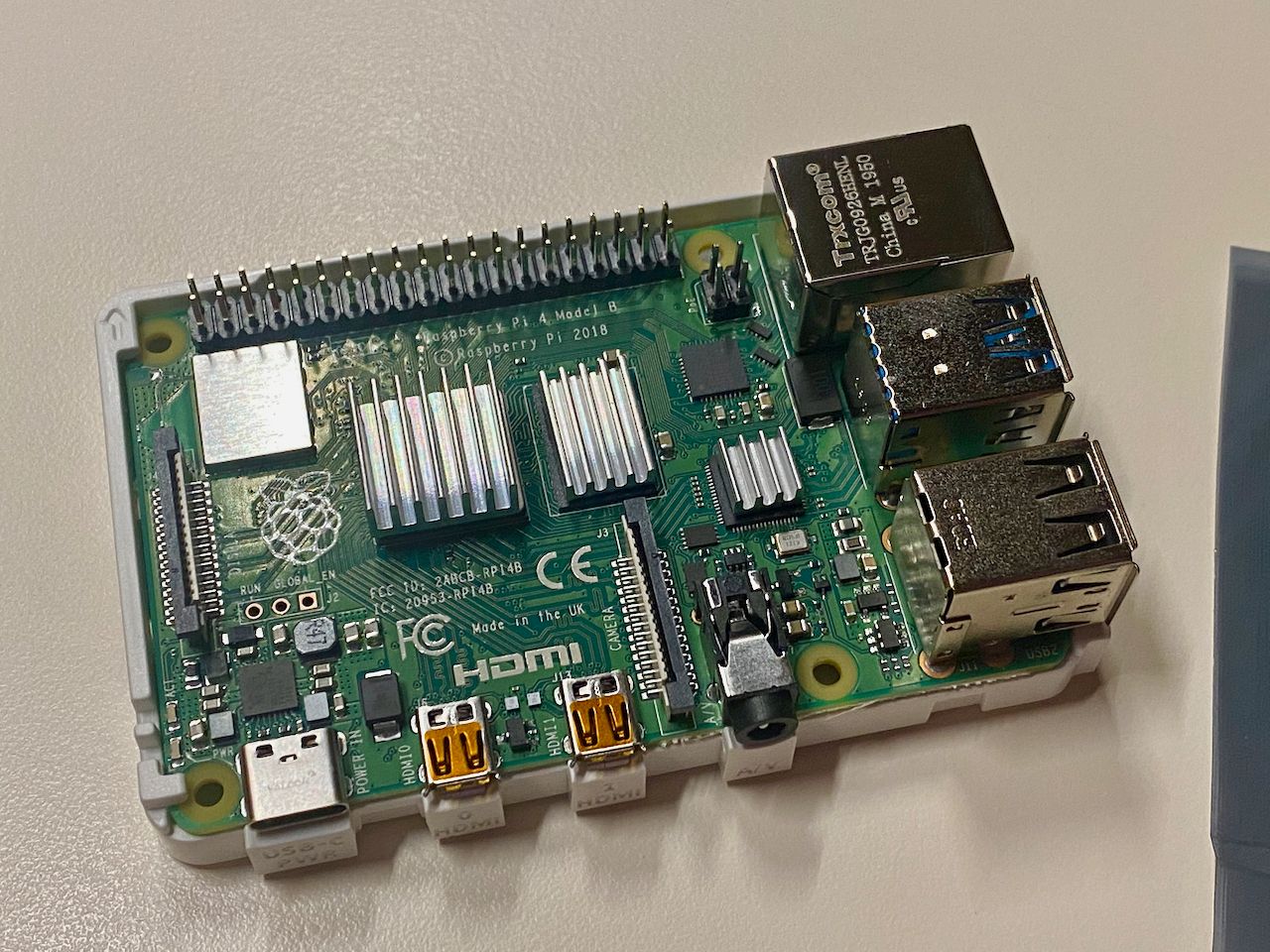
I had a Raspberry Pi 4 that I had been playing around with ever since it came out, but didn’t have a clear purpose for it. I decided to install the PICAN-M on it, and then try out a few different things. I generally purchase the CanaKit bundle when I am buying a Raspberry Pi (I think I have about 15 right now doing various things at home and on the boat) as they tend to include a nice power supply, case, cables, and mainstream brand SD card, but you can get them cheaper without those pieces if you prefer. In this case, the extra parts and pieces were important when I bought the Pi to do testing in general, but were not necessary since the PICAN-M provides power, and the case provided by CanaKit won't work.
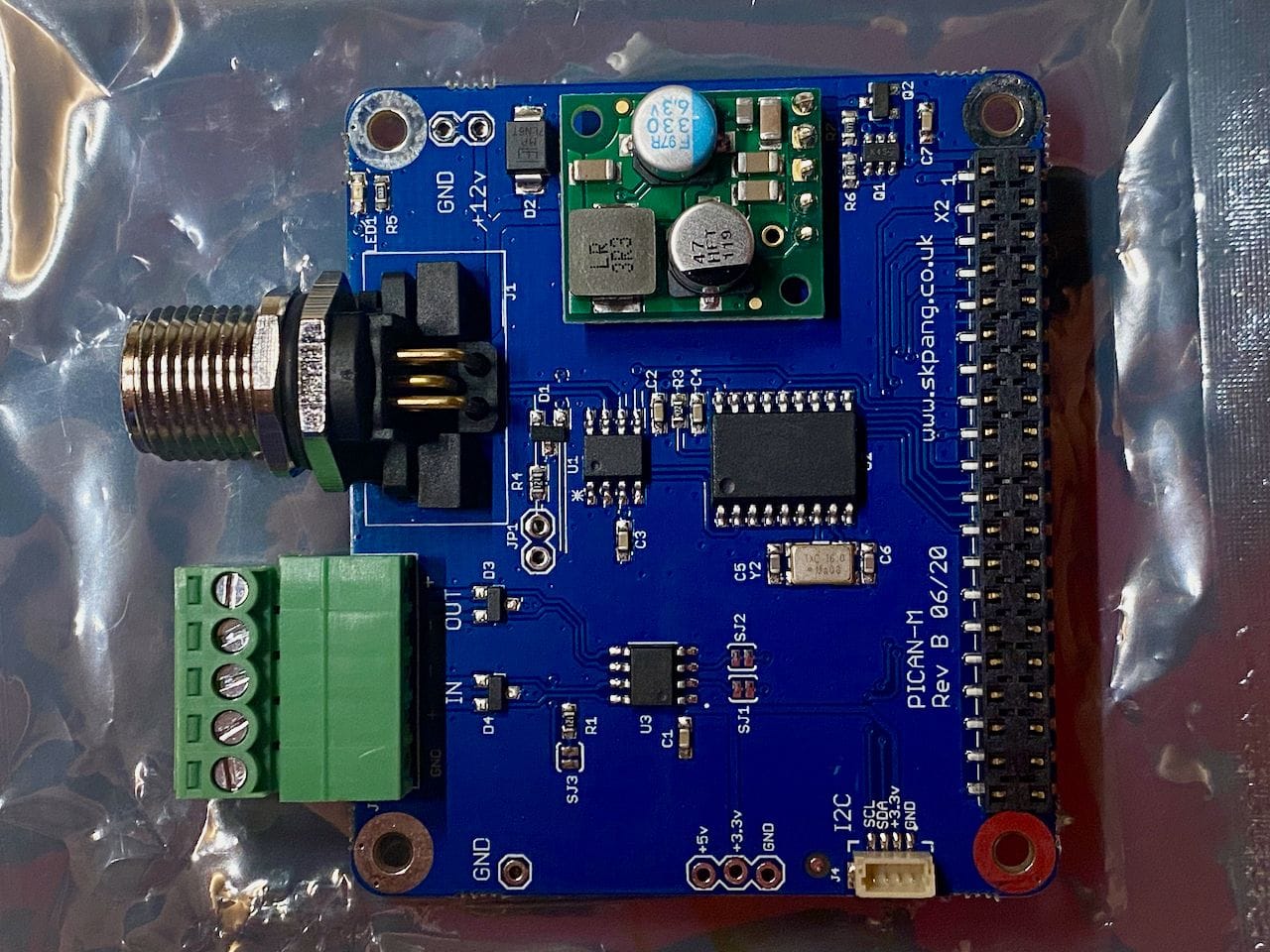
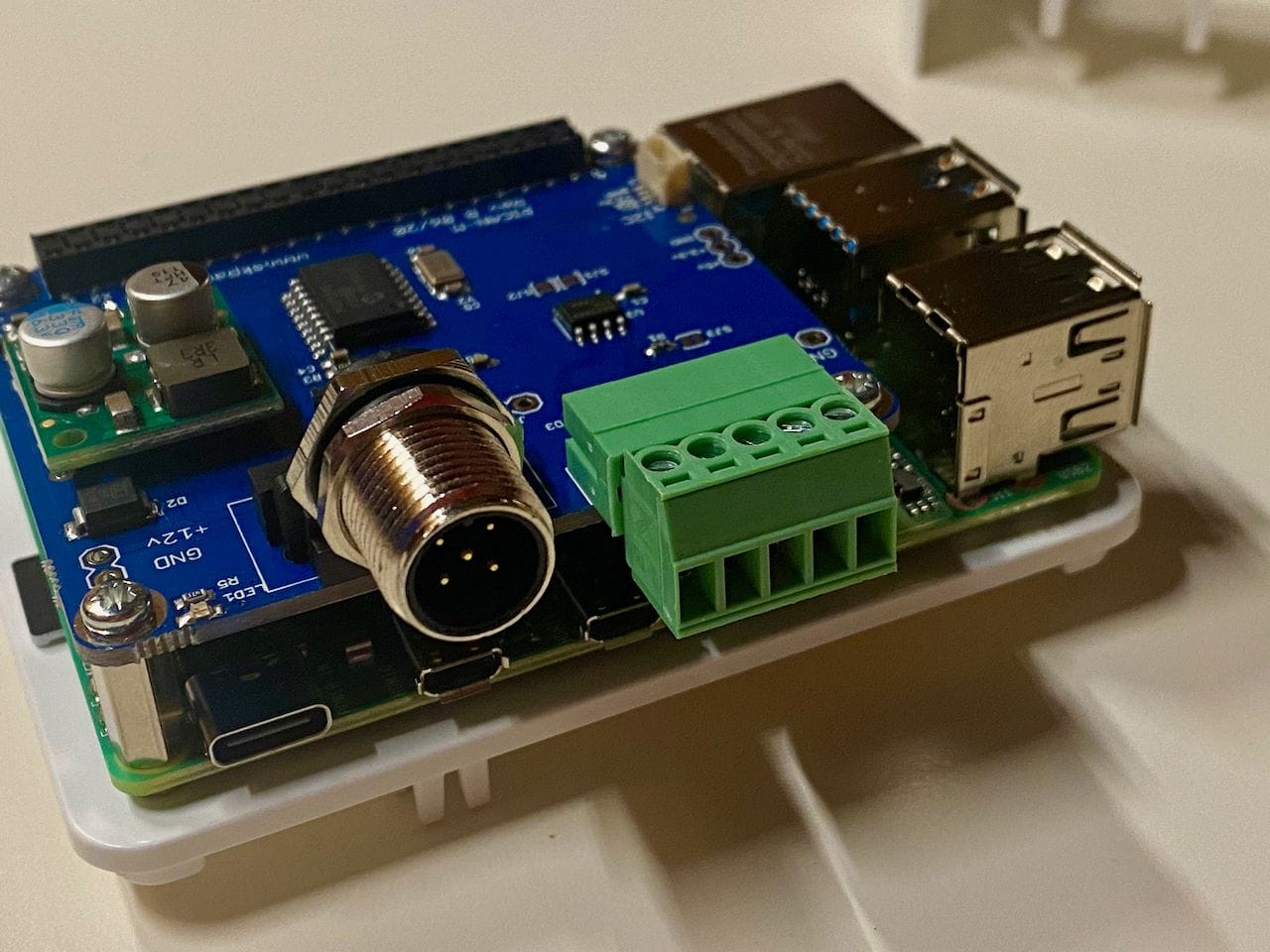
The PICAN-M is a pretty simple, yet well designed board. It has a NMEA 0183 terminal block and NMEA 2000 port on the left side in the picture above, and the connector for the Raspberry Pi on the right hand side.
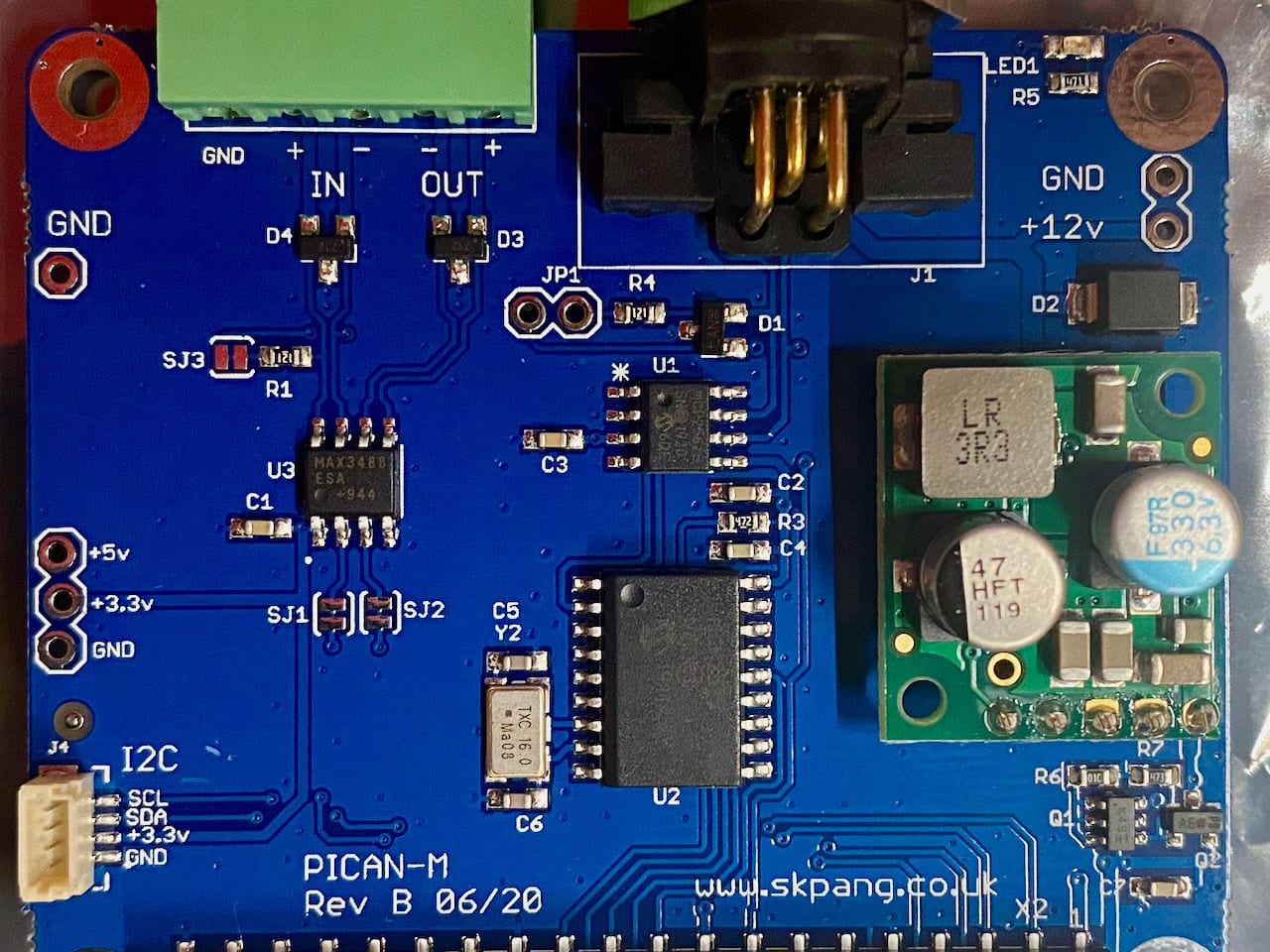
There is a really nice schematic and user guide that SK Pang have provided on their website. The board looks very well built with clearly labeled bits. Here's what SK Pang say the board is capable of:
Features
- CAN connection via Micro-C connector
- 120Ω terminator ready
- SocketCAN driver
- appears as can0 to application
- NMEA 0183 (RS422) via 5-way screw terminal
- appears as ttyS0 to application
- LED indicator (GPIO22)
- Qwiic (I2C) connector for extra sensors
- Include 3A SMPS to power the board and the Pi from 12v line.
- Compatible with OpenCPN, OpenPlotter, Signal K and CANBoat
So besides NMEA 2000 and 0183, you can also connect other I2C sensors if you'd like.
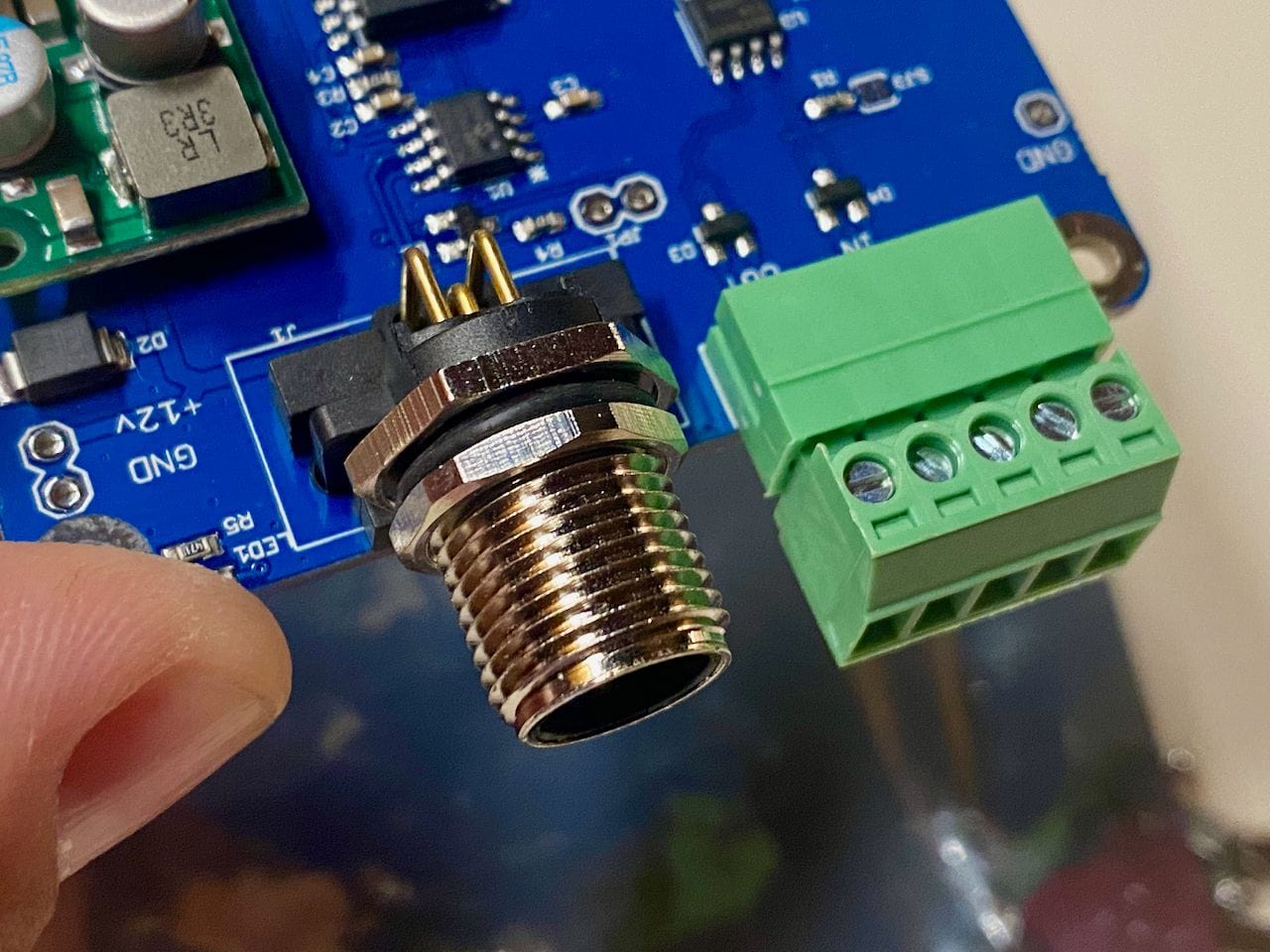
NMEA 2000 Micro-C connector and terminal block for NMEA 0183
The biggest challenge with the board is going to be finding a proper case that has the right cutout.
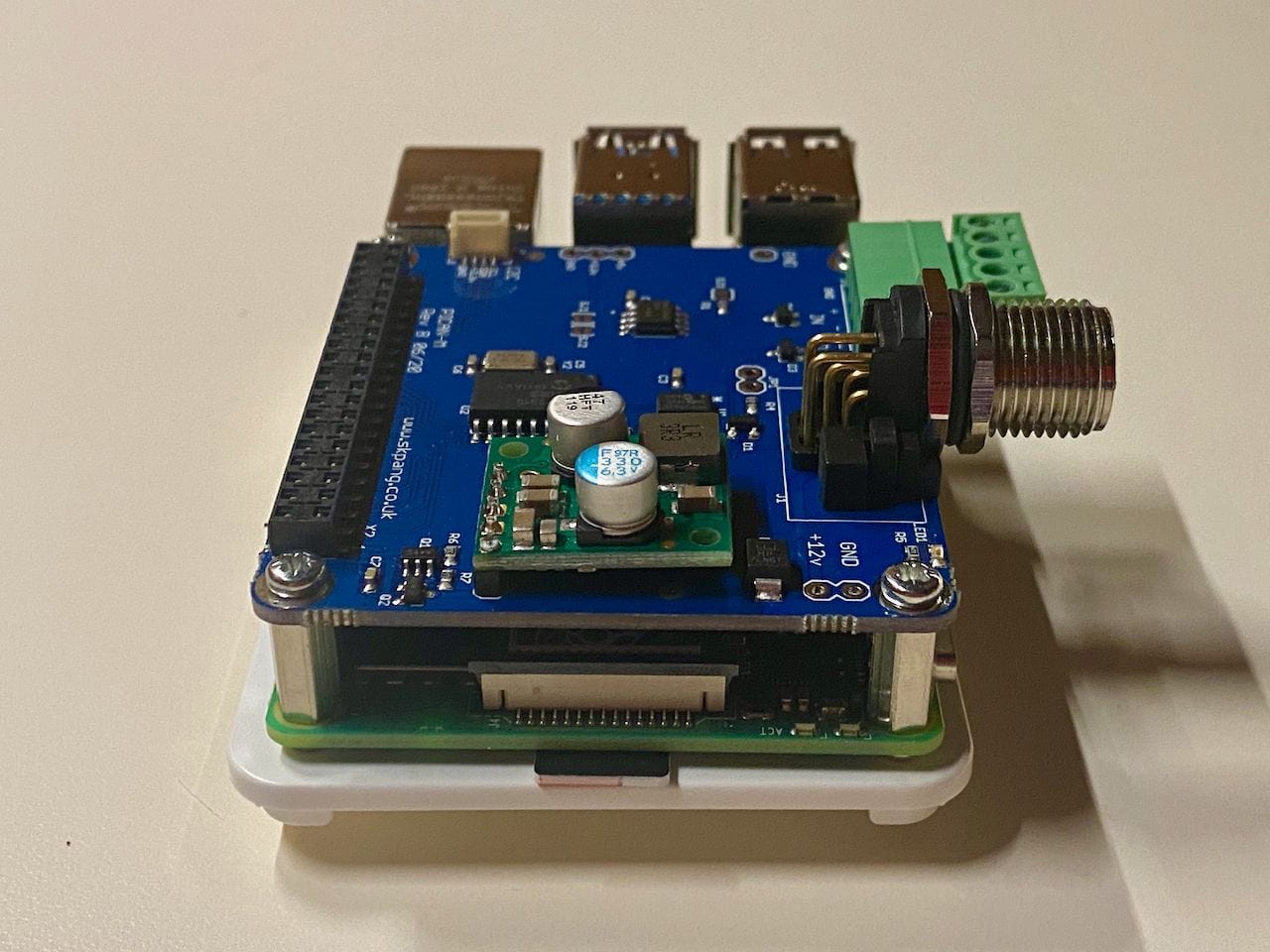
Installing the board is straightforwards. Included in the package are four standoffs and screws which need to be attached to the Raspberry Pi. Then carefully slide the PICAN-M down the pins on the Raspberry Pi until it is well seated, and screw it down to the standoffs.
If you're interested in a step-by-step guide on how to set this up with Signal K, Grafana, InfluxDB and more, check out my article below:
 Steve Mitchell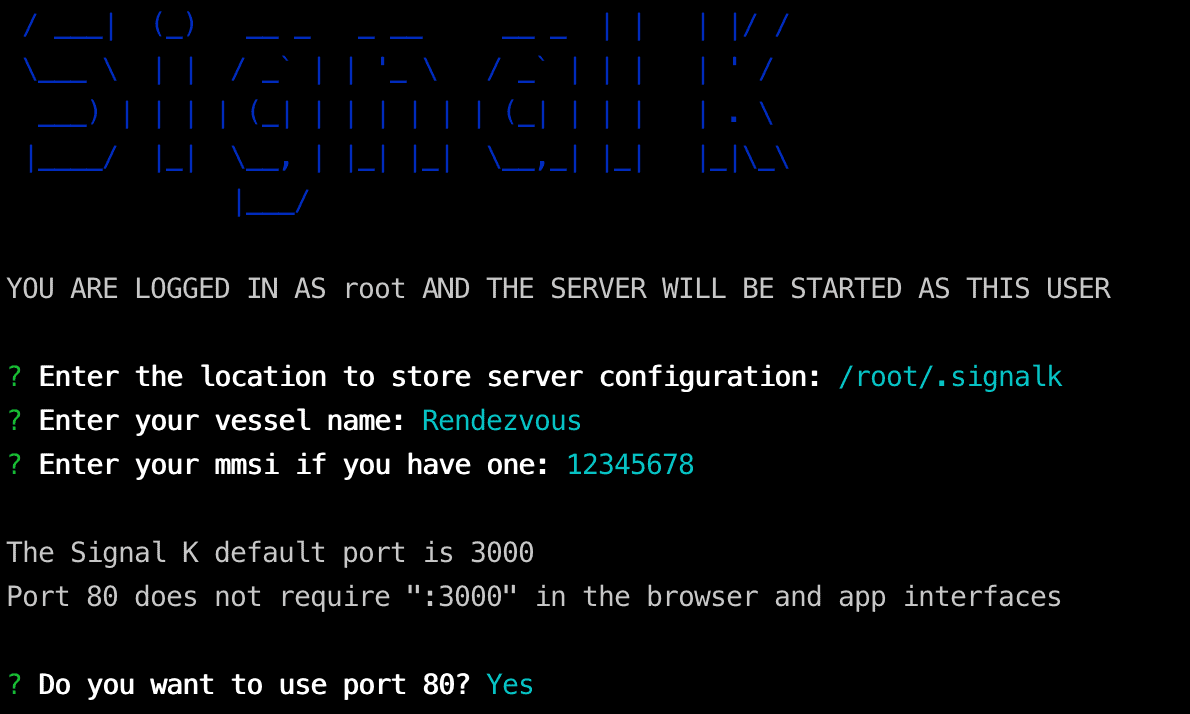
Case
This is probably the only downside to this setup. The standard cases that come with the Raspberry Pi do not assume you will have an add-on or HAT board with it. Those that accommodate HATs are pretty specific, and have holes or punch outs for specific types of connectors. I have not found a NMEA 2000 specific case – perhaps an opportunity for 3d printing!
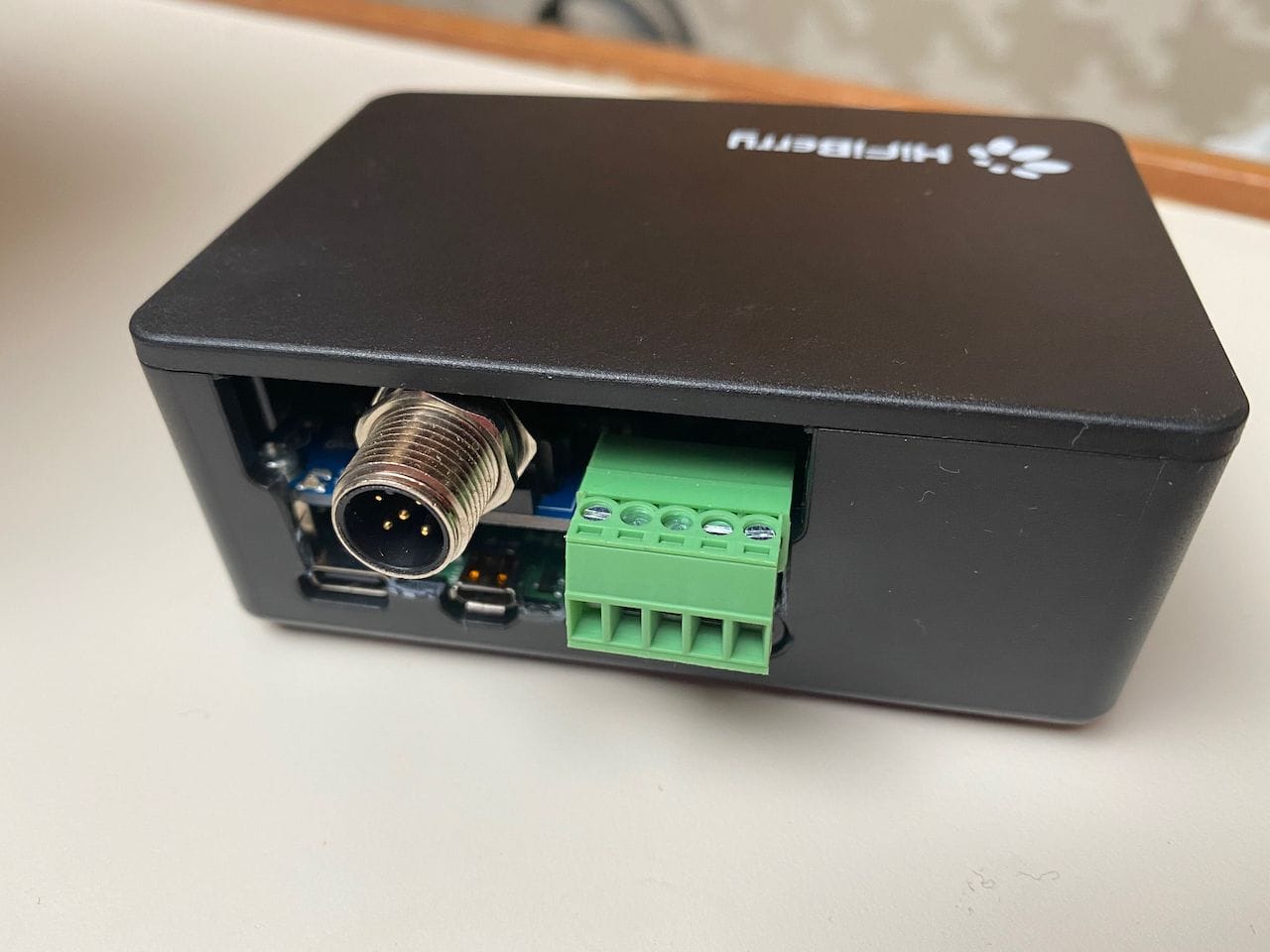
I found a case from HiFiBerry that was meant for an audio HAT and hacked holes in it to allow the NMEA 2000 port to be exposed. It's not great, but it works for now and keeps the boards reasonably safe.
Software & Usage
I installed three different things on the Pi to test with, just for OpenPlotter, OpenCPN, and then just Linux with Signal K.
To do this, I simply connected the NMEA 2000 port to power up the Pi, plugged the included HDMI-mini to HDMI cable into a monitor, connected a keyboard, and followed the install instructions for OpenPlotter/OpenCPN. You can do this in an automated way, or even headless (without a monitor or keyboard) but it can get a bit fiddly if you make a mistake in the installation.
For Linux + Signal K, I used the standard Raspbian server minimal distribution and then installed Signal K afterwards.
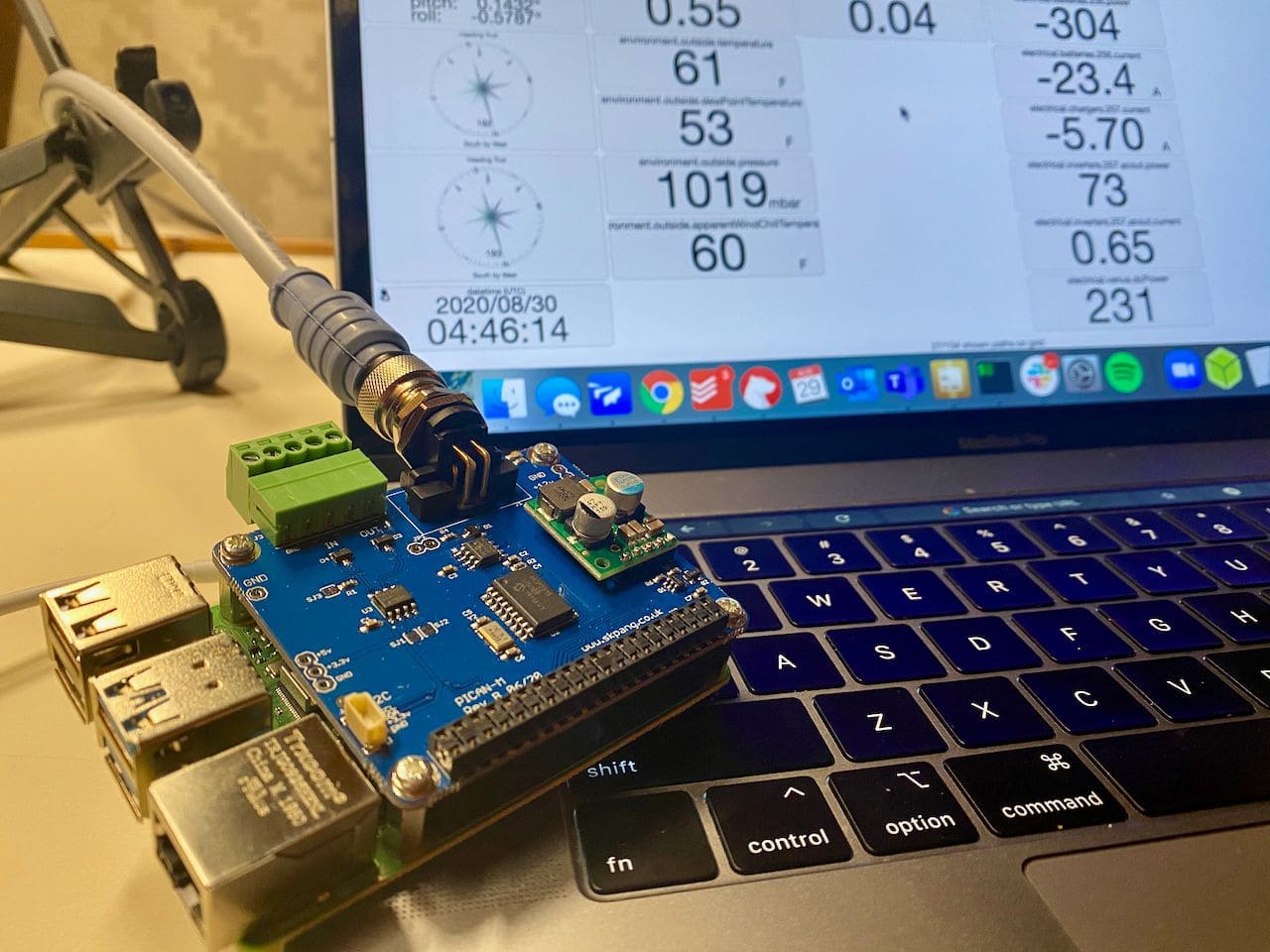
The super nice thing is that the NMEA 2000 port just shows up as can0 to the operating system, so it is very easy to start using one of these applications to access the data on the NMEA 2000 network.
The absolute best part about this entire setup is the fact that the NMEA 2000 port is native, and that it powers the entire computer. No other cables or connections are required.
This opens up even more utility when considering what you could use this for. Besides running heavier applications like the above, you could use these in strategic places all around the boat to create an entire sensor network. Connect it to a NMEA 2000 tee somewhere, and have I2C or other sensors (Raspberry Pi have a wealth of different ways to connect various sensors) connected to tanks, temperature, momentary, etc. and run Signal K on each, spitting the data back to a central Pi or other computer to display things. The possibilities are actually quite exciting. I've tried to do this in the past with Arduino and other technologies, and it has been a bit of a mess with having to power them by battery or other conversions.
Cost & Conclusion
Overall this is a pretty inexpensive way of getting a boat computer on board:
- CanaKit Raspberry Pi 4 bundle – $114.99
- HiFiBerry HighPi case – $17.95
- PICAN-M HAT board – $94.95
- NMEA 2000 cable – $15
Total: $242.89
This is a very reasonable price, and is actually about the same cost as the Actisense NGT-1 USB to NMEA 2000 interface alone! For just under $250, you end up with a bus-powered, low power usage, reasonably powerful computer on your NMEA 2000 network.
You could buy a bare Raspberry Pi instead of one in a kit like I did and save some money, since you won't need a power supply or the case it comes with. You could throw in a 7″ touch screen, similar to what I did on Grace's navigation panel, and have a complete computer setup that you could interact with like a chart plotter, all powered by the NMEA 2000 bus connection.
I think this is a fantastic way to get Signal K on board your boat in a single hardware device, all powered by the NMEA 2000 network. It's also a great way to add OpenCPN or OpenPlotter if you don't have a good navigation / boat management tool already on board. It's well made, easy to put together, and opens up the possibility of having access to boat data for those not interested in the more DIY approach. If you have a NMEA 2000 network, and don't have Signal K installed, this is a perfect way to do it.
Archived Comments
These are read only comments from the old system. Scroll down to participate in SeaBits Discussions, our new interactive forum attached to each article.
Charles Milléquant
November 15, 2020 at 6:26 pm
Thanks for this article. I am currently building my own setup and this PICAN Hat will be part of the game !
I however have a question : how would you manage to add an active cooling device to this setup knowing that Raspberry pi 4 tends to produce a lot of heat and will need to be cooled by a fan if enclosed in whatever case I can fit all of this into ?
Phil
November 15, 2020 at 7:44 pm
Have been using this board full time for about 2 months now. I have not had any problems with a Pi 4 getting hot (in and enclosed case). A tip that caught me out was the the NMEA0183 (RS422) input. to send data to the PiCAN-M use pints IN+ and Ground, not IN+ and IN-
- Charlie
August 3, 2021 at 7:06 pm
Phil,
Can you explain. I want to go from NEMA 0183 RayMarine 6000 auto pilot to the PiCan M. Should it be Out+ Out- from the auto pilot to the In+ and Grnd?
I’m trying to get GPS Output from the 0183 dongle on the USB RPi 4 to an Icom M506 with 0183 and 2000 connections.
Any ideas and help would be greatly appreciated.
Bram de Vries
November 24, 2020 at 11:32 am
Hi Steve,
great article, thanks! I do wonder though if this won’t harm the NMEA2000 power supply, as I believe it is restricted to 1A per client, and a Raspberry Pi can draw up to 3A?
Cheers,
Bram
- David de Regt
November 24, 2020 at 5:31 pm
The Raspberry Pi specs are off the 5V line on the USB port, and it’s a 2.5A theoretical max draw through that. However, in reality, even when you’re doing video transcoding and melting the CPU and GPU on a Pi 4, it’s still been measured well under 1A. 1A @ 5V = ~.4A @ 12V. The max of 2.5A would be right around 1A @ 12V, if you could somehow add enough addon boards and such to use the entire spec, which would be the max 16 LEN or whatever it is on the N2k bus. - Bram de Vries
February 21, 2021 at 11:02 pm
Thanks for elaborating!
ML_C36
December 16, 2020 at 3:45 pm
I have purchased the Pican-M and followed their installation guide. Using the candump, I am able to see the data stream similar to what is shown in the guide. I am however not able to see the data within SignalK, what are the steps for setup within SignalK to recognize the data coming from the Pican?
Note I have successfully been able to get the usb data from my Lobster fridge.
jaymzru
January 17, 2021 at 7:47 am
I was just googling ways to connect a raspberry pi to nmea2k for my Beneteau sailboat, and this article is basically everything I was looking for! Thanks
- Steve Mitchell
January 23, 2021 at 12:52 pm
Glad it’s helpful! I’m just finishing up an article on setting the whole thing up which I am publishing today.
Javier
January 31, 2021 at 9:50 am
Can i use this setup to read the data of my analog sensors, fuel, etc., and export those reading on the nmea 2000 port to my garmin charploter???
- Steve Mitchell
January 31, 2021 at 10:40 pm
You could potentially do this, but it would depend on the analog sensors. You’d have to connect the Raspberry Pi to the analog sensors with some sort of additional connector or device, figure out the analog to digital conversion, and then convert that using a plugin or custom software on the Raspberry Pi and use Signal K to put that data onto NMEA 2000. It would be a decently technical project involving a few pieces.
There are a number of NMEA 2000 sensor products that can adapt analog tank level sensors and such to NMEA 2000 native messages without using the Raspberry Pi that might be easier to get working in a shorter amount of time. It would really depend on the sensors and what they were.
Peter Wadsworth
February 10, 2021 at 9:24 pm
Would there be any incompatibility with using a Navionics chart in this type of setup ? I know it would be more expensive, but where we live, the CPN charts are not as detailed as Navionics.
- Steve Mitchell
February 10, 2021 at 9:45 pm
I’m not sure you could use Navionics here. This setup is mostly for building a server that runs open source software and connecting it to your network. Navionics is a commercial charting company, and I think they only sell their charts for devices like chart plotters, tablets and phones using their apps, etc.
OpenCPN and OpenPlotter both have charts, but they don’t support Navionics either. You’d be stuck using open charts or other free sources.
Hans Bratland
March 3, 2021 at 3:09 pm
Hi, Thanks for your article.
Im looking into upgrading my system with a raspberry pi and openCPN, and wanted to ask something regarding this PICAN-M hat.. I have a daisy AIS reciever (https://shop.wegmatt.com/collections/frontpage) that outputs for NMEA0183. Is it possible to connect this AIS device to NMEA0183 on the PICAN-M board, and from there send the signal out on the NMEA2000 network? So basically using the board as a bridge between the ais and the NMEA2000 network, and at the same time get the ais data on the pi?
Thanks for any help 🙂
- Steve Mitchell
March 3, 2021 at 3:46 pm
Hi Hans,
What you’re proposing should be possible, although I have not tested it myself. You’ll need something like Signal K which would run on the Pi and receive the NMEA 0183 data and ingest it into Signal K. You’d need the Signal K to NMEA 2000 plugin which has support for AIS PGNs 129794, 129038, 129041. This would take the data that Signal K consumes via NMEA 0183 and put it on NMEA 2000.
John Gallo
April 9, 2021 at 3:16 pm
Hi I read this and it was all Greek to me. I was wondering what classes I could take to get e up to speed. I am 72 and retired I feel left in the dust.
- Steve Mitchell
July 29, 2021 at 9:56 pm
This is a pretty technical article that folks with DIY experience are more likely to jump into. If you were interested in learning more about this type of computing, general Linux classes would likely be a good place to start.
Jim
April 11, 2021 at 1:31 am
Thanks for a good post. I just resonantly bought my self a 3D printer, and as a first project I did a case for my CANPI + PI 3 B, see:
https://www.thingiverse.com/thing:4817180
Jim
April 13, 2021 at 9:01 am
Hi
I just recently bought a 3D printer, and one of the first project was a case to my RPI3 and PICAM-M card. More info can be found here:
https://www.thingiverse.com/thing:4817180
Christoph Ritzmann
April 18, 2021 at 1:39 am
Hi Steve
While i was surfing the web, i have found these 2 links for the pican-m case:
https://buyzero.de/products/metal-case-for-pican-m-and-raspberry-pi-4
or
http://skpang.co.uk/catalog/metal-case-for-picanm-and-raspberry-pi-4-p-1594.html
Cheers!
Christoph
Wolfgang
April 21, 2021 at 11:27 pm
Actually, you can purchase a case for the PICAN-M:
http://skpang.co.uk/catalog/metal-case-for-picanm-and-raspberry-pi-4-p-1594.html
- Steve Mitchell
April 22, 2021 at 11:54 am
Yes, I saw that – it just came out recently. Thanks for posting it here! - Bill K
July 8, 2021 at 5:56 am
And it’s a pain in the arse getting the case assembled with the board and pi. It’s very odd how they’ve chosen to make the Pican bolt to the top of the case using stand-offs. The NMEA connector sticking out the side makes it impossible to put the Pican on the Pi first. I finally managed to slide the Pi up into the top of the case and get the GPIO header aligned ‘just right’ into the Pican. It’d have been a lot less tedious if they’d just left from openings in the side of the case to SEE where the GPIO pins line up. - Steve Mitchell
July 13, 2021 at 8:27 am
Which case are you using? There are a few of them now, and I think they’re getting better. - Bill K
July 15, 2021 at 11:01 am
The one CopperHill sells, the metal one.
https://copperhilltech.com/metal-enclosure-for-pican-m-and-raspberry-pi-4/
Their previous pi3 case for the non-N2K board was likewise lame as it required spreading the case enough to clear the connectors and latch, which leads to the plastic bending/cracking. Especially if you do it more than once.
https://copperhilltech.com/plastic-enclosure-for-pican2-and-raspberry-pi-2-3/
Once I stabilize how things are set up I may switch to something different.
Colin
May 8, 2021 at 11:57 am
I have a boat with a Raymarine SeaTalk network. I have a ST60+ Graphic, which can convert SeaTalk to NMEA0183, so I’m trying to use this to interface to the Pican-M / Pi.
I can see data coming over the line, but it’s just garbage – I’m not sure what’s meaning I’m not seeing the correct messages – any ideas?
root@signalk:/home/pi# stty -F /dev/ttyS0 raw 4800 cs8 clocal
root@signalk:/home/pi# cat /dev/ttyS0
����З[�����C����v��I]-�k��������|��ߵѼ���*�ُ����7��������5������-
etc, etc. I see new data every 2 seconds which matches up with what the ST60+ is supposed to be outputting.
- Steve Mitchell
July 17, 2021 at 12:29 pm
Sorry for the late reply – some of the comments got flagged as spam incorrectly.
Did you ever solve this? I might look at the baud rate or other settings around that to see if there is an issue. - Colin
July 19, 2021 at 4:12 am
Hi Steve – no problem thanks for the reply now though!
No I didn’t solve it – I’d figured it would be baud rate, but whatever I tried didn’t make it any better (though it did result in a different version of garbage).
I’ll have another go when I get a chance and see if anything jumps out… at the moment the leaking saildrive and the fridge that’s suddenly stopped working (after we’d just stocked the freezer compartment) is taking priority! - Steve Mitchell
July 25, 2021 at 10:56 pm
Good luck! Sorry for all of the other boating challenges! - Colin
July 19, 2021 at 4:22 am
Not sure if I tried it at 38400 which I now see is the other NMEA0183 rate.
Jim
June 10, 2021 at 4:07 pm
Is there a way to power from the HAT when NMEA 2K power is available then switch to the 5V input if available (ie on shore power)?
- Steve Mitchell
July 15, 2021 at 10:54 am
I don’t know of a way to do this without making modifications to the board itself. There are some alternative boards I am playing with that have slightly better power options – more on that soon. - Marcus Williford
August 26, 2021 at 11:51 pm
I thought about this (just purchased this pican-m), here is an idea. Purchase a NMEA2000 isolator, and a NMEA 12V power T. Install the isolator and power T between the pi and the drop. You can then hook up this 12V power T to a more constant source of power, and you can shutdown the rest of your NMEA network without the PI missing a beat. I didn’t do this yet, but I consider it. I also consider doing this to power off a segment of my NMEA network to conserve power at anchor (i.e. turn off cockpit displays).
Thoughts? - Steve Mitchell
August 27, 2021 at 9:46 pm
My previous boat Grace had a multi-powered NMEA 2000 network (https://seabits.com/grace-integrated-5-part-network/) but I had some weird issues at some point. I can’t remember exactly what it was, but I do know it is possible to have different parts powered and unpowered technically. It’s a good idea to potentially use this method to keep the Pi running. - Bill K
July 16, 2021 at 9:14 am
The ‘switch’ part is the tricky bit. The Pi is basically a linux computer and, as such, has to depend on having reliable file system for all of it’s software. It does not take well to stop/starting the operating system without a clean shutdown. That or extra configuration steps to assure the SD card is set up as largely ‘read only’ to reduce corruption issues. Most inexpensive SD cards to notoriously unreliable when it comes to being used for generic disk I/O purposes.
My point is switching power within the pi during this process is probably a bad plan. It’s probably better to have the power supplied consistently external to the Pi, and switched there instead.
There are various UPS and UPS-like power managers for the Pi. The ‘car-puter’ tinkering efforts have a number of options to consider on that front. Doing clean startup/shutdown based on ignition key actions, for example. - Steve Mitchell
July 17, 2021 at 8:45 am
There is an alternate version of this hardware that I am testing that has a supercapacitor on the board. The purpose is so that if it detects a loss of power from the NMEA 2000 bus, or alternate power sources, it does an orderly shutdown of the Pi using the power remaining in the supercapacitor and safely stops the computer. Pretty neat idea – hoping to have an article published on it soon. - Bill K
July 17, 2021 at 9:08 am
Car Dashcams have been using super-caps for a while now. I have one in my Cayenne. Automagically shuts the camera down cleanly when DC power is removed. Haven’t have an SD card get corrupted for several years now (I rotate the out monthly but they’re all still working ok). - Gary
July 29, 2021 at 3:36 pm
Would that be the Sailor Hat you’re talking about? I’ve read about it and have been trying to find some comparative info between it and the Pican-M, but no luck so far.. - Steve Mitchell
July 29, 2021 at 9:53 pm
That’s correct. I have both, and there are a lot of benefits with the Sailor Hat on the power and NMEA 2000 bus side of things. Perhaps after I write about the Sailor Hat itself, a comparison is in order…
Bill K
July 8, 2021 at 6:06 am
I generally dislike using ‘canned’ images for microSD cards. You never know what compromises were made to set it up. I greatly prefer being able to do installs from scratch (though I’m not so gung-ho as to insist they be compiled from source). It’s bad enough dealing with package manager issues, it almost NEVER gets better starting from someone else’s unknown ‘assumptions’. Thus ‘from scratch’ is preferable.
In the limited time I was futzing with this last weekend I couldn’t find a clear set of instructions on what pieces are actually in an ‘openPlotter’ image and how to recreate it on an existing install. I don’t need to wander down the road of building a whole image, just the various installed pieces to get the same set of things running on an existing image.
Why? Well, beyond questions about known/unknown image choices, there are other things already running on this pi4 that I’d rather not have to backup/reinstall on a different OS image.
- Steve Mitchell
July 13, 2021 at 8:27 am
I am not a fan of OpenPlotter and other distributions like that for the same reason. I started in Linux/UNIX long ago where building it from a base OS was required, and although I am not one to want to spend tons of time just installing packages, I don’t like trusting distributions or packaged solutions that have things I don’t need. Not only does that mean I have to burn my precious LTE data upgrading and updating packages that I won’t use, but there are security concerns with whatever has been installed and configured – did they do it right? Have they secured everything correctly? In addition, a lot of these distributions have a whole windowing interface installed which is a huge CPU suck. In some cases, I’ve seen it consume 75% of the CPU before doing anything at all with the install!
I prefer starting with RPi server image, which is super basic, and building on that myself.
Bill K
July 14, 2021 at 5:08 pm
I also made the mistake of ordering the one that CAN power itself from the n2K bus. I meant to get one that did not. As I want to be able to power cycle the system externally, but don’t want to also power off the n2k bus. That and I don’t want the added drain on the n2k bus to power it.
I’m told that desoldering the small green power supply board on the pican-m will accomplish that. Though I don’t know if that also means I have to use the 12vdc pads on the board.
- Bill K
July 25, 2021 at 6:17 pm
An update, I succeeded in keeping the PICAN-M board from using the N2K bus 12vdc power with the use of an N2K power isolator. I put that in-line from the N2K bus on the drop cable. The PICAN-M gets it’s power through the pi4 GPIO connection. https://www.amazon.com/gp/product/B00ABI6BF4
So now I don’t have to de-solder the add-on power supply board, and control the power to whole setup using the power to the pi4 itself. Which I have going in to the USB-C connection on the pi4, using a 12vdc buck converter from 12vdc.
What I have not yet tried is a direct connection of 12vdc to the solder pads on the PICAN-M board. I don’t know if it will accept the 11-15vdc range typically seen on the DC rail, or if it’s picky and wants actual 12vdc only.
Bill K
July 14, 2021 at 5:13 pm
Upside is I did managed to get various pieces working and could see all the active data on the bus. I have several devices that provide the same sentences (gps from a puck and a sat compass, along with that and heading, pitch and other info overlapping from an airmar weather unit. Their instances are set uniquely but it wasn’t immediately clear how to select the various sources. But I’ll tinker with that another time.
Though now that I have more than one thing that can consume AIS it looks like I’ll have to get that put onto the n2k bus. Right now it’s from a Furuno FA-50 via ethernet to the TZT3 units, and 0183 to the old NN3D MFD12 plotters. I’ve got a Yacht Devices router and will probably use that. As I’m interested in keeping a PC out of the message-passing part of the equation, for now. Dedicated, lower-power devices seem to handle this sort of thing better, with less fuss over time.
Adrian
July 26, 2021 at 2:24 am
Hi!
Thanks for a great post! I am myself trying to set up a navigation computer with a PI where I want to plug in an AIS (em-trak). Doing it with a PICAN-M HAT looks like it would do the job! I just wonder (I am very much a novice with both Raspberry Pi and OpenCPN), do you install the “regular” Pi first, and set it up with OpenCPN/OpenPlotter, and when you’ve got that up and running, add the PICAN-M? Or do you do the configuration with everything from start?
I also wonder about the power supply from the HAT. Does it power the PI automatically when connected to NMEA or is that something that has to be configured?
Many thanks from Sweden!
Adrian
- Steve Mitchell
July 28, 2021 at 10:06 am
Hi Adrian,
I would have the PICAN-M installed before doing any operating system installation. You could add it afterwards, but that would require messing around with the hardware twice, so why not just do it all at the beginning.
Yes, the PICAN powers the Pi if it is connected to a NMEA 2000 bus. You can also power it other ways. No configuration is required in software, if that’s what you’re asking.
Gary
July 29, 2021 at 3:48 pm
I already have a RPI4 installed on my boat with a 5V 5A buck converter connected to OpenPlotter. Does it make sense for me to get the Pican-M without the SMPS?
- Steve Mitchell
July 29, 2021 at 9:54 pm
I think having power via the traditional method vs. pulling it off of NMEA 2000 would be a better choice longer term.
Archived Community Comments
These comments were posted on the SeaBits forum before February 2026. Scroll down to join the current discussion.
I am currently testing an alternative to the PICAN-M from Hat Labs and hope to have some results in the next month or two. The name of the product is the Sailor Hat for Raspberry Pi and is available at https://hatlabs.fi/product-category/sh-rpi/sh-rpi-devices
Do you think that I could run this PICAN-M / Pi Solution off of the back of a Fusion Entertainment MS-RA70NSX head unit, which has NMEA2K on the back for their NMEA remotes?
The goals here would be to offer up an elegant media server solution, improve overall audio quality (versus Bluetooth) with the Pi and potentially a USB-powered DAC.
It should work in theory, right? Am I missing something?
That could potentially work. The only things I would be concerned about is power and termination. Most Fusion head units will power a NMEA 2000 network, while some require a special cable. You’ll have to figure out which one your model is.
Once you have the power side of things, then you’ll still need to terminate it on both “ends” so you will have to have a couple of tees at least along with the terminators. I don’t think you’ll have reliable results by just plugging the PICAN directly into the head unit without that.
Really interesting post. Apologies for newbie question, but if you can point me in the right direction then I’ll do my homework so hopefully future questions will be more intelligent!
I have a Raymarine setup which runs SeaTalk NG. I would like to achieve the following:
- be able to deliver course-adjust instructions to the autohelm (SPX10 Course Computer). I would enter these using 4 Momentary Push On switches: +/- 1deg to port/starboard & +/-10deg to port/starboard
I’m picturing a switch panel connected to the Pi, and the Pi then connected to the SeaTalk NG circuit.
Is this a feasible goal? What kit do I need?
Many thanks, Rich
My first reaction would be whether there is a Raymarine remote that you might be able to add that would be marine grade, already tested for this sort of use, and more likely to work
However, I don’t see why you couldn’t use a Raspberry Pi + SignalK to do some of this. The easiest way, and it would require a decent amount of technical ability still, would be to connect the switches to the Pi, and then use something like NodeRED + SignalK to watch those inputs and send the autopilot change messages out. Depending on those messages, you might be able to use some of the existing plugins in SignalK that do Raymarine autopilot stuff, or you might have to write your own.
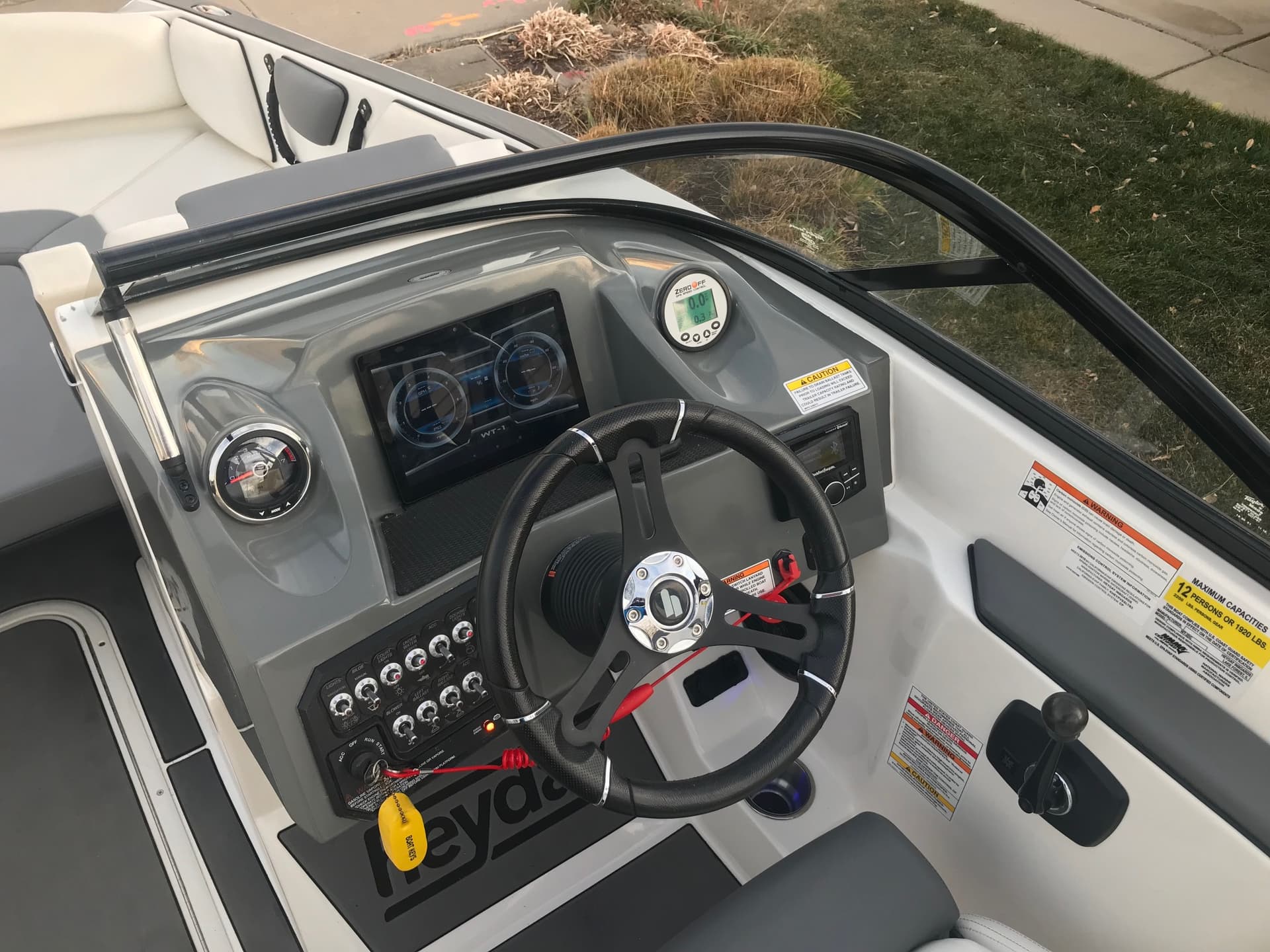
Sorry for the newbie question, but I just picked up a new boat, and wanted to play with some stuff like this. What I was hoping to do was get this Pi hardware to put on the NMEA2000 bus and then be able to access this information from maybe a webpage I put together being hosted by the Pi?
I was thinking that way I can dedicate an e-ink tablet or Kindle paperwhite (waterproof and can view in direct sunlight) on my boat dashboard. I would like to see speed, RPM, fuel levels but also some details outside the network like Time, Time to sunset, some sensors I plan to add to the Pi.
The existing tablet on the dash can’t be seen in the sun as it’s just not bright enough. The problem is the app for the existing NMEA transmitter is only for Android tablets and does not have all the data I would like to see.
Hi @Ivan
Your concept seems reasonable enough. What I would want to do first is to verify that the information you want to display is indeed on the NMEA 2000 network and that it is in a format that can be interpreted. In some cases, manufacturers will use proprietary busses to transmit their information. In other cases, they’ll use NMEA 2000 but still use proprietary messages that can sometimes be hard to decode.
The easiest way to do this would be to grab a Pi and stick it on the bus and see what is there. Pretty low investment cost, and if for some reason you needed to do some software development or create a SignalK plugin for your engines or the data, you could start there.
Thanks. Yeah, I have a couple Pi 3Bs laying around here, and a zero W sitting here too. I figured I would pick up that CAN + PS top hat for the 3B and give it a go.
Since the data feeding the tablet app via wifi is This device which just sits on the CAN bus, (and that info is also available on the CAN Open dial LCD display) I think getting the data into the raspberry pi should be possible.
I just am not very experienced with raspberry pi yet. I first was looking at an e-ink android tablet to load this existing wifi tablet app, but I kind of want more data and using a Pi might be a good interface that would allow more expansion into the future.
I would definitely check out SignalK and even Scott Bender’s excellent app WilhelmSK. The latter requires iOS, but I use it in tons of places and really like the reliability and marine related features.
Even without that, the instrument panel plugin app for SignalK, which it comes with by default, displays any sort of data and gauge on a webpage, and likely would be a good starting point for the data.
Sorry to bump an old topic, but I’m embarking on something like this for my RV. As such, I’m pretty unfamiliar with the ins and outs of NMEA 2000 and what it is capable of over an RPi.
The question I have is whether two RPi units both running Signal-K, but where only one is connected to an NMEA 2000 device can pass data back and forth, wirelessly.
My use case is pretty simple:
- VenusOS running on an RPi 3B,
- Plex on an RPi 3A connected to an NMEA 2000 enabled JL Audio Media Master head unit
- Signal-K Server running on an RPi 4B at the other end of the RV where the tank sensors are located
I want to monitor and control everything via Signal-K and WilhelmSK. Can the RPi units transmit data and control signals wirelessly? Or do the two Signal-K RPi units need to be physically connected to the NMEA 2000 network (assuming they can be powered independently).
I think I’d need a little clarification before being able to say yes or no.
I assume the VenusOS will be running one copy of Signal K. Is it connected to Victron stuff? No NMEA 2000? Some Victron stuff does leverage NMEA 2000, so you may end up having it already there…
Is the Plex server the only device on NMEA 2000?
What else do you want to control on NMEA 2000?
For that matter, what all do you want to control in general?
Signal K can talk to other Signal K servers over WiFi/ethernet/network and you can share between them, but when you get to controlling things, it would depend on what is connected to what where, and what sort of controls you’re looking to leverage.
Yes. One RPi will be in the forward section of the RV near the batteries and chargers running VenusOS Large which includes an optional Signal-K and Node Red server built in to the OS. The connections will be through USB-VE.Direct cables.
The only devices in the RV that support NMEA will be a soon-to-be-purchased SeeLevel NK2 tank monitor and a JL Audio Media Master head unit (stereo). I may eventually upgrade the charging and inverter system which may eventually have NMEA capabilities but for now, it’s just these units. My plan was to employ PiCAN-M HATs on the RPi devices.
The Plex server will be in the aft section of the RV sitting next to the head unit so would be ideal to control the head unit via its NMEA 2000 port. The tank monitors are squarely on the middle of the RV and relatively difficult to reach. I just need to read them.
Long term plans may include fan controls, lights, and inverter controls. The inverter installed currently supports RV-C but the support for that protocol isn’t as robust it seems. I’m not sure I can run both RV-C and NMEA devices - the USB adapters seem to be insanely priced as well.
I think what would help here would be a high level diagram on how you would like to see them connected, and what each is connected to medium-wise to understand how you’d like them to work.
In theory, you could have Signal K instances connected via direct connections to some of these, plus VenusOS of course, and have Signal K share info back and forth over a WiFi network. Where you will run into limitations is what you want to control from where.
In some cases, Signal K could share the info between instances, but actual control logic might require a new plugin, or some sort of functionality that doesn’t exist yet. That diagram could help us understand more about those relationships, and where you would want to control what.
Just thought I’d mention that while your article extensively says that the board will power itself and the PI from the NMEA 2000 line, you actually link to the version of the PICAN-M board that does not provide that functionality. You might want to update your links to point to the correct version (or make it clear that there are two versions of the board) so folks don’t order the wrong one, thinking it’s the one you are describing in your article.
Hmmmm… when I click on the link I end up on the board that indicates it provides power to both:
This board includes a 3A SMPS. The 12v is from the Micro-C network can be use to power the PiCAN-M and the Raspberry Pi.
The URL that I end up on is below:
It does look like they’ve changed their links from the original article almost 3 years ago, but it redirects to that link above.
Looks like it’s just the second one – in the “Cost & Conclusion” section at the end.
I did speak with someone at Copperhill Tech and they sent a link to the SMPS that you can buy separately for not much more than the difference of the PiCAN-M and PiCAN-M-SMPS: Pololu - 5V, 3.2A Step-Down Voltage Regulator D36V28F5
Actually, it’s also the link on “I ordered one from Copperhill Technologies” at the top as well (under the “An easier way….” section). Maybe Copperhill changed it to the non-powered version and added the powered version separately…